EducationSoftwareStrategy.com
StrategyCommunity

Knowledge Base

Product

Community

Knowledge Base

TopicsBrowse ArticlesDeveloper Zone

Product

Download SoftwareProduct DocumentationSecurity Hub

Education

Tutorial VideosSolution GalleryEducation courses

Community

GuidelinesGrandmastersEvents
x_social-icon_white.svglinkedin_social-icon_white.svg
Strategy logoCommunity

© Strategy Inc. All Rights Reserved.

LegalTerms of UsePrivacy Policy
  1. Home
  2. Topics

KB41757: In MicroStrategy 9.4.x-10.x, after importing a package through Command Manager, user notices that Schema has not been updated even though during package creation the 'Update Schema' options were chosen.


Community Admin

• Strategy


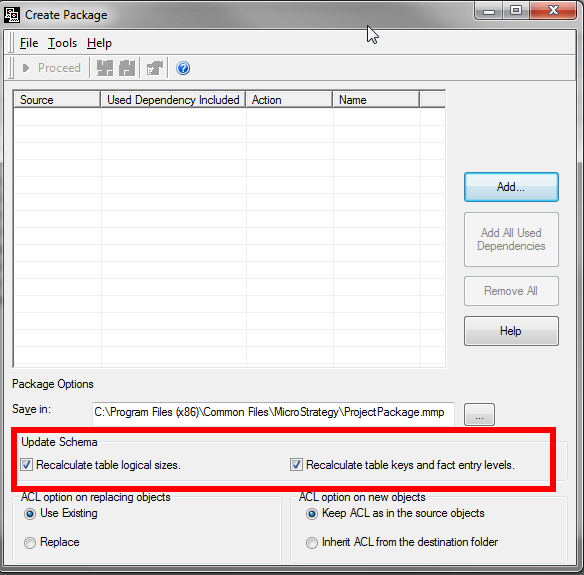
This knowledge base article documents a known behavior in MicroStrategy 9.4.x-10.x, in which after importing a package through Command Manager, user notices that Schema has not been updated even though during package creation the 'Update Schema' options were chosen.

SYMPTOM:
In Strategy 9.4.x-10.x, users notice that the project schema is not updated after importing a package through Command Manager that makes changes to schema related objects even though upon package creation the 'Update Schema' options were checked.  The 'Update Schema' options should automatically update the schema of a project when importing a package.
ka04W000000OeJrQAK_0EM4400000029gu.png

 
CAUSE:
This is a limitation with importing packages through Command Manager. 
 
ACTION:
Contact Strategy Technical Support for further help regarding this issue.
 
WORKAROUND:
Choose either to import packages through Object Manager or remember to explicitly update the schema after importing a package through Command Manager. This can be done either through Developer or from Command Manager.


Comment

0 comments

Details

Knowledge Article

Published:

June 12, 2017

Last Updated:

June 12, 2017