EducationSoftwareStrategy.com
StrategyCommunity

Knowledge Base

Product

Community

Knowledge Base

TopicsBrowse ArticlesDeveloper Zone

Product

Download SoftwareProduct DocumentationSecurity Hub

Education

Tutorial VideosSolution GalleryEducation courses

Community

GuidelinesGrandmastersEvents
x_social-icon_white.svglinkedin_social-icon_white.svg
Strategy logoCommunity

© Strategy Inc. All Rights Reserved.

LegalTerms of UsePrivacy Policy
  1. Home
  2. Topics

KB41763: When using Dynamic Metric Aliasing to include a prompt selection in the metric name, the prompt name is shown instead of the prompt value in MicroStrategy Web 9.4.1


Community Admin

• Strategy


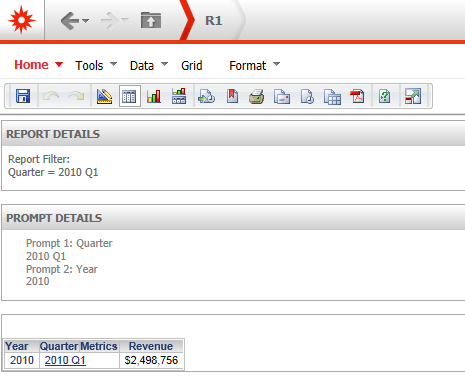
When using Dynamic Metric Aliasing to include a prompt selection in the metric name, the prompt name is shown instead of the prompt value in MicroStrategy Web 9.4.1

SYMPTOM:
When using Dynamic Metric Aliasing to include a prompt selection in the metric name, the prompt name is shown instead of the prompt value in Strategy Web 9.4.1
 
STEPS TO REPRODUCE:
  • Create a report with Year, Quarter, Revenue, and a prompt on Year

ka04W000000ObI1QAK_0EM4400000026vz.png
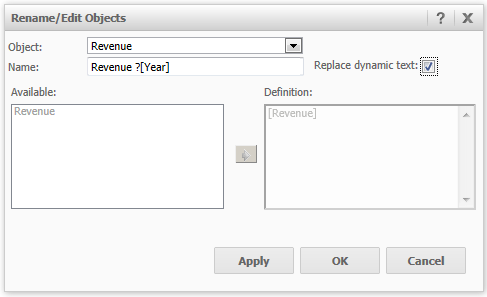
  • Rename the Revenue metric    
  • Using the provided syntax ( ? ), include the Year prompt in the metric name and click OK.

ka04W000000ObI1QAK_0EM4400000026w1.png

CAUSE:
The report must be saved before the correct name will display
 
ACTION:
Save and re-run the report.
41763


Comment

0 comments

Details

Knowledge Article

Published:

May 31, 2017

Last Updated:

March 30, 2019