EducationSoftwareStrategy.com
StrategyCommunity

Knowledge Base

Product

Community

Knowledge Base

TopicsBrowse ArticlesDeveloper Zone

Product

Download SoftwareProduct DocumentationSecurity Hub

Education

Tutorial VideosSolution GalleryEducation courses

Community

GuidelinesGrandmastersEvents
x_social-icon_white.svglinkedin_social-icon_white.svg
Strategy logoCommunity

© Strategy Inc. All Rights Reserved.

LegalTerms of UsePrivacy Policy
  1. Home
  2. Topics

KB417725: Using MicroStrategy Enterprise Manager, how to determine which report/reports jobs were not executed as part of document executions?


Community Admin

• Strategy


When a report services document is executed, a child job is created for every dataset and each individual report's execution data is recorded in the Statisics tables. In Strategy Enterprise Manager, there is no indicator that can directly indicate if a report execution is because of a document execution or if it's a direct report execution. The document job column in the IS_REP_FACT table will be -1, if the report job is from a direct report execution and not a document execution. It is possible to obtain the reports that were not executed as part of documents, using the approach explained below.
 

STEPS TO IMPLEMENT

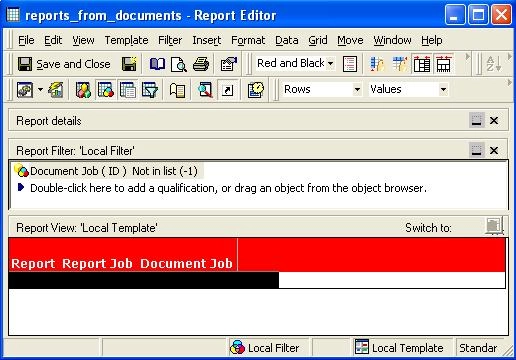
  • Create a report with attributes: report, report job, document job. The filter on that report should be defined as 'Document Job (ID) NOT IN LIST (-1)', as shown below. This report will provide all reports/report jobs which are because of document executions.
ka04W000000OfZaQAK_0EM440000002EgD.jpeg
  • Create a report with attributes: report, report job and document job. Add a filter 'Report (ID) > 0' and the report created in step 1 (as report as a filter), as shown below. Change the logical operator between the filters from 'AND' to 'AND NOT'. The first filter, 'Report (ID) Greater than or equal to 0,' is a dummy filter to impose 'AND NOT' before the report as filter.
ka04W000000OfZaQAK_0EM440000002EgC.jpeg
  • Executing the above report will give all reports which were not executed from documents. The attribute 'Document Job' is optional to this report and was added only to indicate that the Document Job ID corresponding to these reports is -1. The Report Job attribute can also be moved to the report objects window, if desired.
ka04W000000OfZaQAK_0EM440000002EgF.jpeg

KB417725


Comment

0 comments

Details

Knowledge Article

Published:

June 12, 2017

Last Updated:

December 31, 2018