EducationSoftwareStrategy.com
StrategyCommunity

Knowledge Base

Product

Community

Knowledge Base

TopicsBrowse ArticlesDeveloper Zone

Product

Download SoftwareProduct DocumentationSecurity Hub

Education

Tutorial VideosSolution GalleryEducation courses

Community

GuidelinesGrandmastersEvents
x_social-icon_white.svglinkedin_social-icon_white.svg
Strategy logoCommunity

© Strategy Inc. All Rights Reserved.

LegalTerms of UsePrivacy Policy
  1. Home
  2. Topics

KB41788: Images on a dashboard fail to load due to an incorrect URL being triggered when using MicroStrategy Web 9.x.


Community Admin

• Strategy


SYMPTOM: 
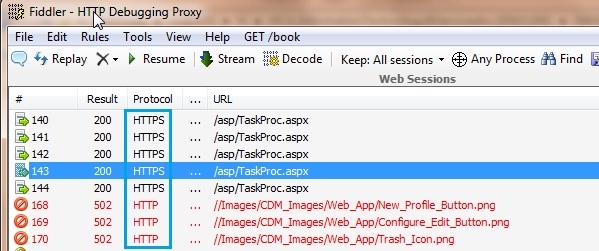
Images on dashboard fail to load due to incorrect URL being triggered. The incorrect URL is formed using HTTP when HTTPS should be used. (see image below, images are retrieved using HTTP protocol and other requests are using HTTPS protocol)
 

ka04W000000OfZVQA0_0EM4400000026un.jpeg

 
CAUSE: 
Cause is unknown. Potentially it's related to the environment network setup; however, this issue can be resolved using the following workaround below.
 
WORKAROUND: 
Add the configServletPath parameter in global section of the Strategy.xml file under WEB-INF as following:


<application>
<global>
<parameter name="configServletPath" value="https://<webServer>:port/MSTRWeb/"/>

After making this change, restart the web server to have it take effect.


KB41788


Comment

0 comments

Details

Knowledge Article

Published:

June 13, 2017

Last Updated:

December 31, 2018