The Strategy Product Suite allows comparisons between attributes. This document provides the steps to implement attribute to attribute comparison and provides information regarding how a join is made between tables to perform this comparison.
The steps below have been provided based on the Strategy Tutorial Project. To illustrate the example discussed below, the warehouse data has been modified.
The 'Order Date' attribute from the Strategy Tutorial project records the date an order is placed. Another attribute, 'Ship Date', records the date the order is shipped. If a report is required to show orders that are shipped on the same date, a filter that can perform a comparison between these two attributes is necessary.
The following report displays all customers, their orders, order and shipping dates and each order's sales figures.
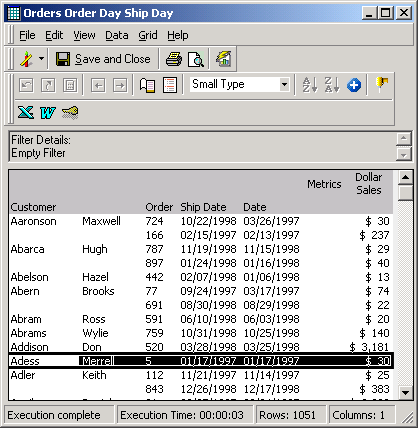
Notice that the highlighted row is the only row in which an order has the same order and shipping date.
The desired report should appear as follows:
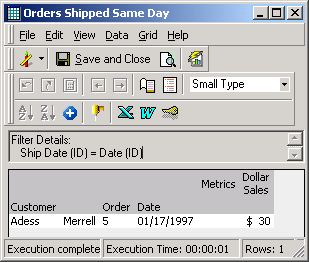
This report displays the customer, order, date and sales for all orders shipped the same day they were placed. The Filter Details pane displays the attribute-to-attribute comparison information.
STEPS TO CREATE FILTER:
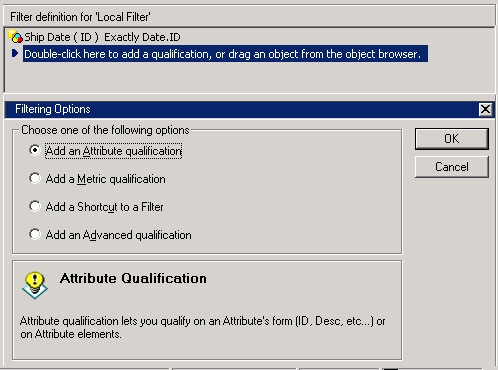
To create this filter, an attribute qualification has to be added to the report, as illustrated below:
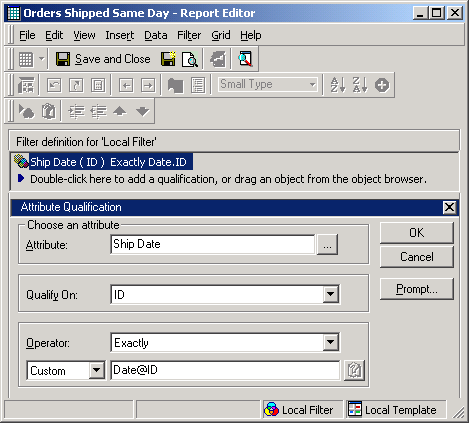
The definition of the filter is as follows:
SQL GENERATION:
The report generates the following SQL:
select a22. AS CUSTOMER_ID,
 max(a23.) AS CUST_LAST_NAME,
 max(a23.) AS CUST_FIRST_NAME,
 a22. AS ORDER_ID,
 a21. AS DATE_ID,
 sum(a21.) as DOLLARSALES
from  a21,
  a22,
  a23
where a21. = a22. and
 a22. = a23.
 and a21. = a21.
group by a22.,
 a22.,
 a21.
< ; (Date@ID = @ID) > {Order}
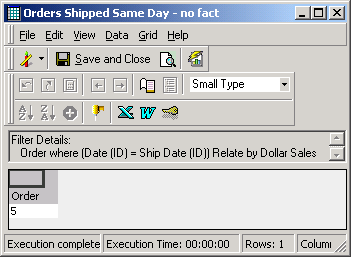
This report generates the following SQL:
select a31. AS ORDER_ID
from  a31
where (exists (select *
 from  r21
 where r21. = r21.
  and r21. = a31. ))
