EducationSoftwareStrategy.com
StrategyCommunity

Knowledge Base

Product

Community

Knowledge Base

TopicsBrowse ArticlesDeveloper Zone

Product

Download SoftwareProduct DocumentationSecurity Hub

Education

Tutorial VideosSolution GalleryEducation courses

Community

GuidelinesGrandmastersEvents
x_social-icon_white.svglinkedin_social-icon_white.svg
Strategy logoCommunity

© Strategy Inc. All Rights Reserved.

LegalTerms of UsePrivacy Policy
  1. Home
  2. Topics

KB41825: "Can't load AMD 64-bit .dll on a IA 32-bit platform" error message appears when testing connectivity using HelloSAP tool from MicroStrategy against SAP.


Community Admin

• Strategy


This knowledge base article explains why "Can't load AMD 64-bit .dll on a IA 32-bit platform" error message appears when testing connectivity using HelloSAP tool from MicroStrategy against SAP.

SYMPTOM:
Users testing connectivity from Strategy Intelligence Server using HelloSAP against SAP can potentially face the error shown below:


Trying to connect to SAP system ...


java.lang.UnsatisfiedLinkError: C:\Program Files (x86)\Common Files\MicroStrategy\sapjco3.dll: Can't load AMD 64-bit .dll on a IA 32-bit platform
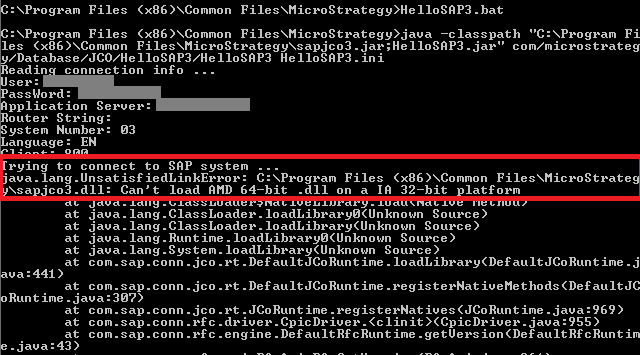


This error is presented when running the batch process in the command line:

ka04W000000OhccQAC_0EM440000002HNI.png

  
CAUSE:
HelloSAP.bat file is calling the 'java' 32-bit application set up in the default classpath variable on the machine, and JCo libraries installed are 64-bit libraries.  The call made looks like the one shown below:


java.exe -classpath "C:\Program Files (x86)\Common Files\MicroStrategy\sapjco3.jar;HelloSAP3.jar" com/MicroStrategy/Database/JCO/HelloSAP3/HelloSAP3 HelloSAP3.ini

 
ACTION:
User  running HelloSAP tool can edit the .bat file to run the 'java' application shipped with the Strategy installation.  After edition the call should look like the one below:
 

"C:\Program Files (x86)\Common Files\MicroStrategy\JRE\160_25\Win64\bin\java.exe" -classpath "C:\Program Files (x86)\Common Files\MicroStrategy\sapjco3.jar;HelloSAP3.jar" com/MicroStrategy/Database/JCO/HelloSAP3/HelloSAP3 HelloSAP3.ini


Third Party Software Installation WARNING
The third-party product(s) discussed in this technical note is manufactured by vendors independent of Strategy. Strategy makes no warranty, express, implied or otherwise, regarding this product, including its performance or reliability.


Comment

0 comments

Details

Knowledge Article

Published:

May 8, 2017

Last Updated:

May 8, 2017