This technical note outlines how consolidations work with compound metrics in Strategy Developer. The designed behavior is explained using an example consolidation and compound metric based on objects in the Strategy Tutorial project.
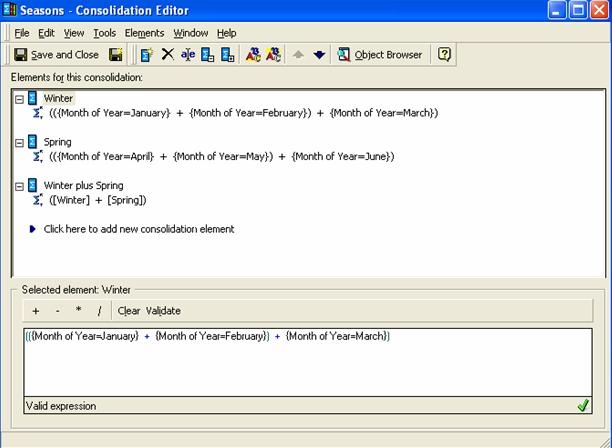
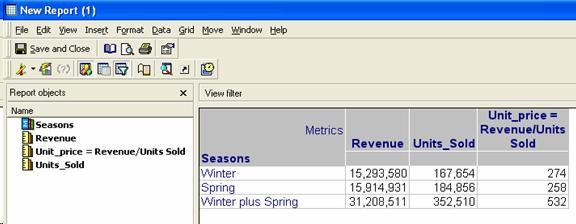
After executing the report, it is seen that the compound metric values are not that values that are expected. The values for Unit_Price metric for the 'Winter plus Spring' element is calculated as 274+258 instead of 31,208,511/352,510.
The reason for this behavior is that for consolidations to operate correctly, they are designed so that any mathematical operator used to create a consolidation is the last operator used to calculate the information.
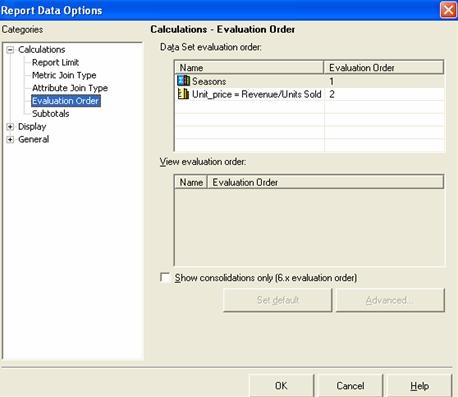
The evaluation order of the consolidation and compound metric in the report has to be modified by evaluating the consolidation first followed by calculating the metric. To modify the evaluation order, navigate to the Data menu in the report editor and access Report Data Options - Evaluation Order, as illustrated below:
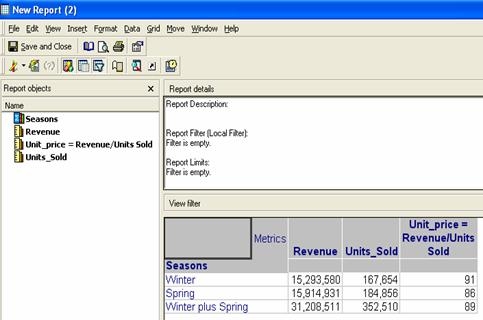
The settings change the results set and the metric values are as they are expected to be, as illustrated below:
KB418344
