EducationSoftwareStrategy.com
StrategyCommunity

Knowledge Base

Product

Community

Knowledge Base

TopicsBrowse ArticlesDeveloper Zone

Product

Download SoftwareProduct DocumentationSecurity Hub

Education

Tutorial VideosSolution GalleryEducation courses

Community

GuidelinesGrandmastersEvents
x_social-icon_white.svglinkedin_social-icon_white.svg
Strategy logoCommunity

© Strategy Inc. All Rights Reserved.

LegalTerms of UsePrivacy Policy
  1. Home
  2. Topics

KB41860: What are the timeout settings controlled by IIS 10 that affect MicroStrategy Web?


Community Admin

• Strategy


Besides the Web Timeouts controlled by MicroStrategy there are three timeouts that the user needs to check when configuring IIS in order to avoid timeout issues.

Besides the Web Timeouts controlled by Strategy, there are three timeouts that the user needs to check when configuring IIS in order to avoid timeout issues.
 
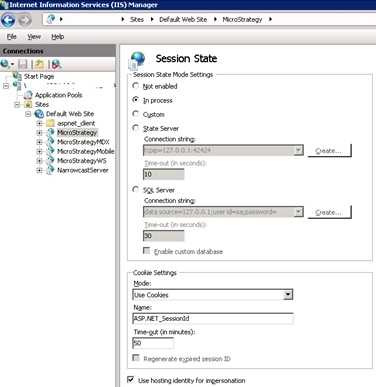
1. IIS Session State Timeout.
   This setting can be found on the IIS manager under WEB_SERVER_NAME > Sites > Default WebSite > Strategy > Session State.
 
   The value set here will be saved on the web.config file.
 

ka04W000000rZPVQA2_0EM4400000026vB.jpeg

 
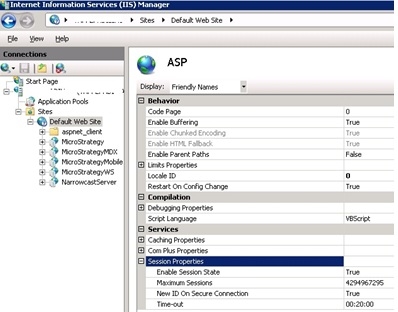
2. ASP Timeout.
 
    This setting can be found on the IIS manager under WEB_SERVER_NAME > Sites > Default WebSite > Strategy > ASP  > Session Properties.
 

ka04W000000rZPVQA2_0EM4400000026vD.jpeg

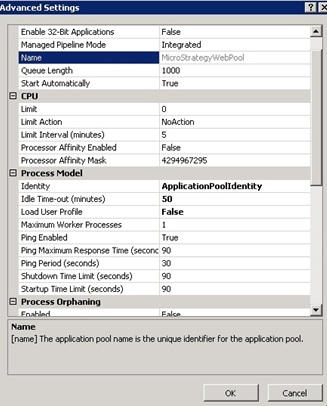
3. Application Pool Timeout.
 This setting can be found on the IIS manager under WEB_SERVER_NAME > Application Pools > StrategyWebPool > Advanced Settings.
 

ka04W000000rZPVQA2_0EM4400000026vF.jpeg


Strategy recommends setting these three IIS settings to a higher value than the one used for the "Web user session idle time (sec)" setting, specified from Strategy Developer under Intelligence Server Configuration > Governing.
3725


Comment

0 comments

Details

Knowledge Article

Published:

March 29, 2017

Last Updated:

November 28, 2023