SYMPTOM:
When a datatype time is 12:00:00 AM in the database, this is being displayed as a date 12/30/1899 in a selector in Strategy Web 9.2.1
STEPS TO REPRODUCE:
Follow the steps below to reproduce this issue in the Strategy Tutorial project:
1. Add a table LU_HOUR to the Strategy Tutorial Warehouse in Microsoft Access and populate it with all 24 hours or the day as shown below

2. Using Warehouse Catalog, add the table In Strategy Desktop
3. Create attribute Hour mapped to the Hour_ID column from table LU_HOUR
4. Change the form format from datetime to time as shown below and click yes to warning messages.
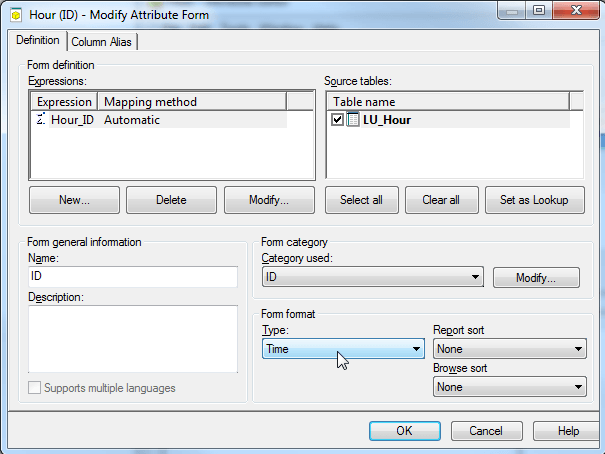
5. Update Schema
6. Create a report with the attribute Hour
7. In Strategy Web create a document with the previously created report
8. Add a Drop down selector on the Hour attribute
9. Select the Drop down and notice the hour 12:00:00 AM shows as 12/30/1899

CAUSE:
This is a known issue in Strategy 9.2.1.
ACTION:
Please contact Strategy Technical Support on an update to this or change all 12:00:00 AM times to 12:00:01 AM. The issue only occurs when the time is exactly 12:00:00 AM.

Strategy Only Begin
Issue logged as Scopus ID 580632,601432 and TQMS ID 695829.
