EducationSoftwareStrategy.com
StrategyCommunity

Knowledge Base

Product

Community

Knowledge Base

TopicsBrowse ArticlesDeveloper Zone

Product

Download SoftwareProduct DocumentationSecurity Hub

Education

Tutorial VideosSolution GalleryEducation courses

Community

GuidelinesGrandmastersEvents
x_social-icon_white.svglinkedin_social-icon_white.svg
Strategy logoCommunity

© Strategy Inc. All Rights Reserved.

LegalTerms of UsePrivacy Policy
  1. Home
  2. Topics
  3. KB41888: "[Invalid Project Source Name]" error message appears when using MicroStrategy Command Manager in command line mode to create a project source.

KB41888: "[Invalid Project Source Name]" error message appears when using MicroStrategy Command Manager in command line mode to create a project source.


Stefan Zepeda

Salesforce Solutions Architect • Strategy


This document outlines "[Invalid Project Source Name]" error message appears when using MicroStrategy Command Manager in command line mode to create a project source.

SYMPTOM:


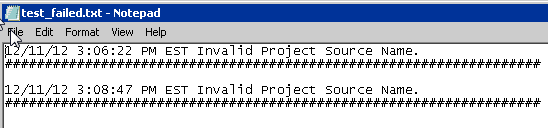
The following error can be found from the log file when using MicroStrategy Command Manager 9.x in command line mode to create a project source:
ka04W000000Oe2JQAS_0EM4400000029gF.png
Invalid Project Source Name.


Also, the following message appears when using MicroStrategy Configuration Wizard on the Intelligence Server machine to create a project source:

ka04W000000Oe2JQAS_0EM4400000029gK.png
A MicroStrategy Intelligence Server was not found at this location. Would you like to use this machine name anyway?


CAUSE:

The user ID that was used to launch Command Manager through the command line does not have administrator privileges on the machine.


ACTION:

Use a user ID that has administrator privileges to run the command.


Comment

0 comments

Details

Knowledge Article

Published:

February 21, 2023

Last Updated:

January 31, 2024