SYMPTOM:
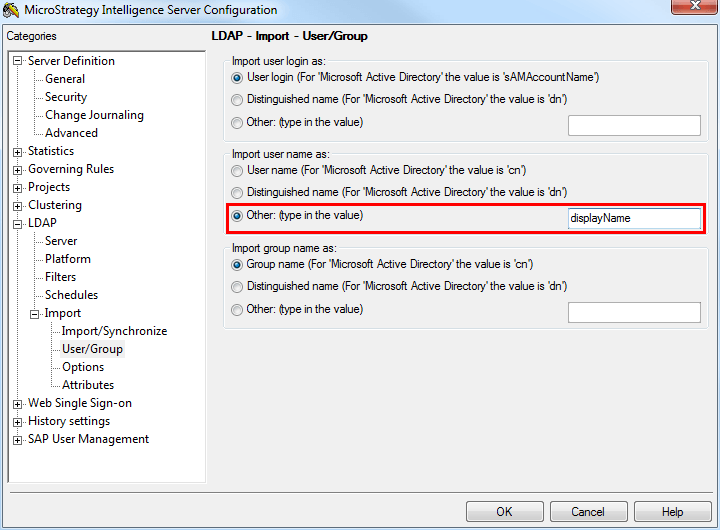
When importing and synchronizing users from LDAP in Strategy 9.x, the imported LDAP users are not properly renamed when using a custom imported LDAP attribute. Instead the users are imported to Strategy using the default attribute for the LDAP server. This behavior is configured as shown below:
CAUSE:
There are many causes for this type of behavior but in this instance the authentication user was incorrectly specified by not using the distinguished name (DN). As a result of not using the distinguished name for the authentication user, the attributes were not able to be configured properly for usage in Strategy. If the specified attribute cannot be found on the LDAP server, the Intelligence Server automatically defaults to importing the attribute 'cn' as the user name.
ACTION:
Ensure that the authentication user is specified using the distinguished name and not any other attribute. Also, in order to utilize attributes from the LDAP server in Strategy, they must be configured under the LDAP attributes menu shown below:
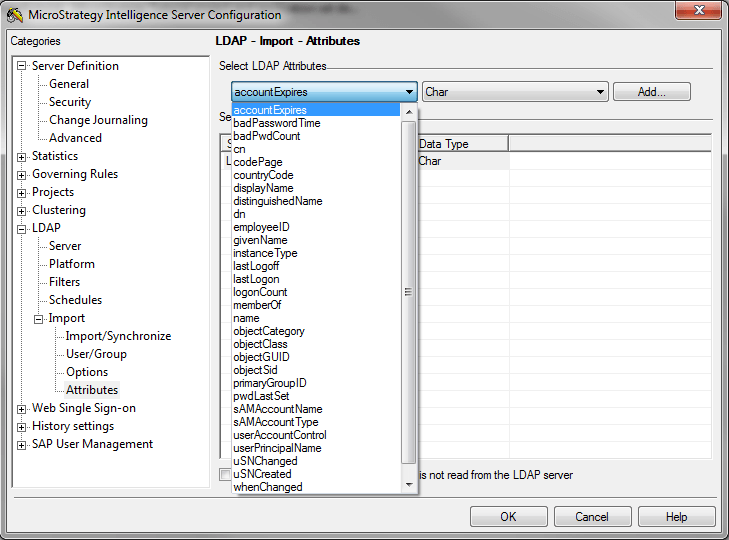
note: If attributes do not appear in the above menu this indicates that the authentication user does not have access the attributes and/or that the distinguished name (DN) was not used.
