SYMPTOM:
A level metric using the 'None' grouping is not returning correct values when used in conjunction with a consolidation on a report in Strategy Desktop/Developer 9.4.1/10.x
CAUSE:
The metric value is a multiple of what the actual value should be. This is a known issue in Strategy Desktop/Developer 9.4.1./10.x
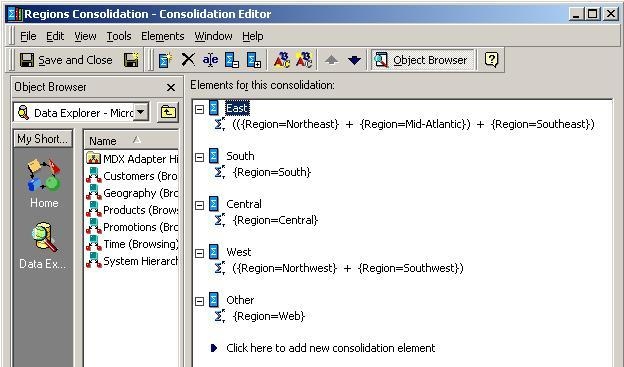
In the image below, the 'East' consolidation element is defined as three regions: Northeast, Mid-Atlantic, and Southeast. The 'West' consolidation element is defined as two regions: Northwest and Southwest. All other consolidation elements are defined by a single region, as shown below:
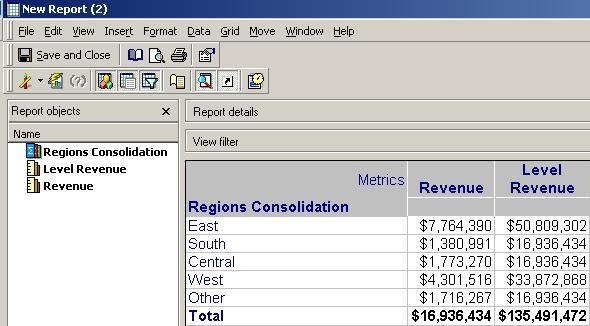
The following image is a report that contains the Regions consolidation, the Revenue metric, and a level metric called Level Revenue that has standard filtering with grouping set to 'None'. Note that the metric Level Revenue value is three times what the actual value should be for East and two times for West, as shown below:
ACTION:
Contact Strategy Technical Support for an update on the status of this issue.
WORKAROUNDS:
Instead of a consolidation, a custom group can be defined. This has been tested to work successfully in a 9.4.1 HF6 environment.
Another possible workaround is to divide the consolidation element expression by the number of attribute elements in that consolidation element (e.g. / 3.0). This will cause the level metric to return the correct level metric value. However, this will cause all other metrics in the report to return incorrect values.
KB419046
