EducationSoftwareStrategy.com
StrategyCommunity

Knowledge Base

Product

Community

Knowledge Base

TopicsBrowse ArticlesDeveloper Zone

Product

Download SoftwareProduct DocumentationSecurity Hub

Education

Tutorial VideosSolution GalleryEducation courses

Community

GuidelinesGrandmastersEvents
x_social-icon_white.svglinkedin_social-icon_white.svg
Strategy logoCommunity

© Strategy Inc. All Rights Reserved.

LegalTerms of UsePrivacy Policy
  1. Home
  2. Topics

KB41920: The user cannot resize or maximize the ScanMD Window in MicroStrategy 9.x


Community Admin

• Strategy


The user does not have the ability to resize or maximize the ScanMD window. When ScanMD is running against multiple projects, there is no way to see all of the tests running at the same time.

Symptom:
 
The user does not have the ability to resize or maximize the ScanMD window. When ScanMD is running against multiple projects, there is no way to see all of the tests running at the same time.
 
Steps to Reproduce:
 
1. Run ScanMD against all projects in a project source
2. In the ScanMD window there is no way to maximize or resize the window.
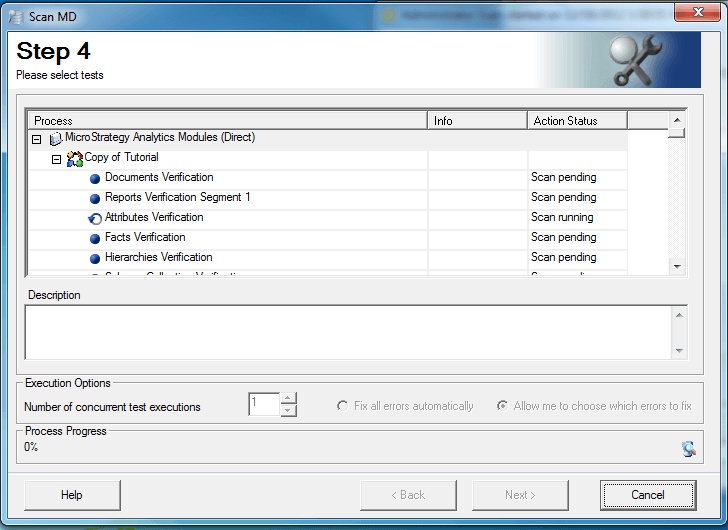
 

ka04W000000Oc0IQAS_0EM440000002D1b.png

 
Cause:
 
This issue is working as designed. Currently, ScanMD does not have an option to maximize or resize the window. There is an existing enhancement request to have the ability to maximize the ScanMD window.
 
Action:
 
Contact Strategy Technical Support for an update on this issue.
 
The Strategy Internal Reference Number for the issue discussed in this technical note is 41920. 


Comment

0 comments

Details

Knowledge Article

Published:

May 31, 2017

Last Updated:

May 31, 2017