EducationSoftwareStrategy.com
StrategyCommunity

Knowledge Base

Product

Community

Knowledge Base

TopicsBrowse ArticlesDeveloper Zone

Product

Download SoftwareProduct DocumentationSecurity Hub

Education

Tutorial VideosSolution GalleryEducation courses

Community

GuidelinesGrandmastersEvents
x_social-icon_white.svglinkedin_social-icon_white.svg
Strategy logoCommunity

© Strategy Inc. All Rights Reserved.

LegalTerms of UsePrivacy Policy
  1. Home
  2. Topics

KB41934: Large Documents exported from MicroStrategy Web and Developer 9.x using Microsoft Excel 2003 lose formatting, past a certain number of rows.


Stefan Zepeda

Salesforce Solutions Architect • Strategy


Large Documents exported from MicroStrategy Web and Developer 9.x using Microsoft Excel 2003 lose formatting, past a certain number of rows

SYMPTOM:
 
When large documents are exported from Strategy Web and Developer using Microsoft Excel 2003, they lose formatting after a certain number of rows. This behavior is determined by the amount of data in the exported document and there is no specific number of rows after which the formatting is lost. The issue happens in Excel 2003 exports only and is not seen in PDF exports.
 
STEPS TO REPRODUCE:
 
In Strategy 9.2.1:
  • Create a grid report with a lot of attributes and metrics that returns thousands of rows of data
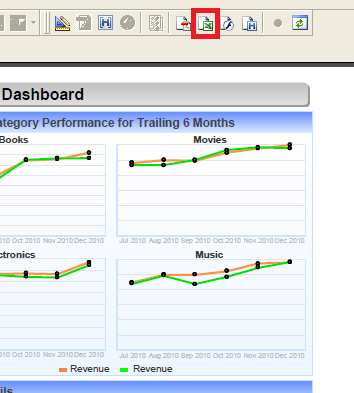
  • Execute the document in Strategy Developer and export to Excel
    Note: users could export the document in Strategy Web as well, but depending on the size of the document, the internet browser might freeze and become unresponsive

ka02R000000kcb6QAA_0EM440000002D2D.png
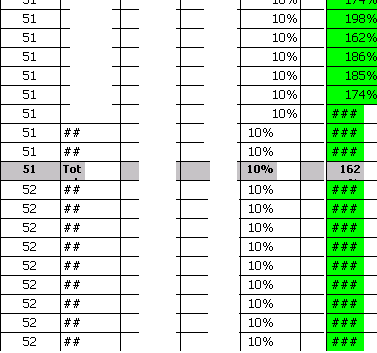
  • Users will see that the document exports fine to Excel but past a certain point or considerable number of rows, it will lose formatting:
     
ka02R000000kcb6QAA_0EM440000002D2J.png

CAUSE:
 
This is a limitation in Microsoft Excel 2003 where the application is not able to handle the formatting of large amounts of data past a certain point.
 
ACTION:

  1. Export the document using Microsoft Excel 2007 or higher - for Strategy Web this can be set in the Web Preferences > Export options.
  2. Filter the document to return less data, and export the data in several segments.

Comment

0 comments

Details

Knowledge Article

Published:

April 11, 2017

Last Updated:

April 11, 2017