EducationSoftwareStrategy.com
StrategyCommunity

Knowledge Base

Product

Community

Knowledge Base

TopicsBrowse ArticlesDeveloper Zone

Product

Download SoftwareProduct DocumentationSecurity Hub

Education

Tutorial VideosSolution GalleryEducation courses

Community

GuidelinesGrandmastersEvents
x_social-icon_white.svglinkedin_social-icon_white.svg
Strategy logoCommunity

© Strategy Inc. All Rights Reserved.

LegalTerms of UsePrivacy Policy
  1. Home
  2. Topics

KB419429: “The user does not have Browse access to this User object (ID is ‘XXX’)” error appears when viewing the properties on any object in MicroStrategy Developer


Stefan Zepeda

Salesforce Solutions Architect • Strategy


This knowledge base article describes an issue where “The user does not have Browse access to this User object (ID is ‘XXX’)” error message appears when users attempt to view the properties on any object in MicroStrategy Developer

SYMPTOM:
When users attempt to view the properties on an object, the following error message appears:

 

ka02R000000kb3yQAA_0EM440000002Fty.jpeg

 
The user does not have Browse access to this User object (ID is '54F3D26011D2896560009A8E67019608').
Note: The Object ID '54F3D26011D2896560009A8E67019608' is always associated with the user 'Administrator' created by default for all metadata.
 
CAUSE:
The user does not have the necessary ACL permissions for the 'Administrator' user. To verify this, login as the Administrator and open the properties of the 'Administrator' user.
 
Note that the Everyone user group does not have View permissions:
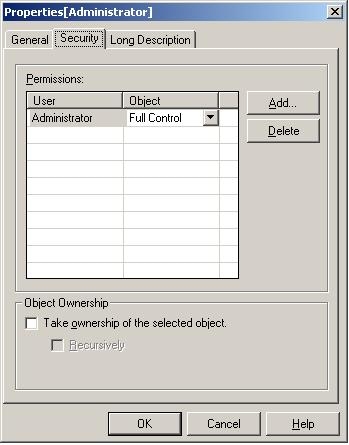
 

ka02R000000kb3yQAA_0EM440000002Fu2.jpeg

 
ACTION:
To resolve this issue, add the 'Everyone' group with the View permission to the 'Administrator' user's ACL, which is the default setting:
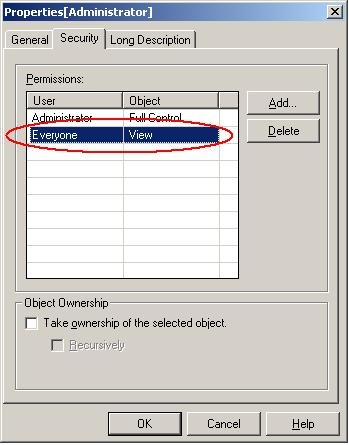
ka02R000000kb3yQAA_0EM440000002Fu4.jpeg

 
Now, when logging in as the user and viewing the properties of any object, no errors will appear.
This issue has been logged as KB19429
KB419429


Comment

0 comments

Details

Knowledge Article

Published:

June 7, 2017

Last Updated:

December 27, 2018