Reporting requirement:
A user has a fact table containing a Customer key, an Effective Date key, and various fact values. The user needs to calculate metrics only for the rows in the fact table corresponding to the latest effective date for each Customer. Each customer may have a different effective date, so a simple date filter will not suffice.
Consider an analogous situation in the Strategy Tutorial project. A user wishes to see the total Revenue for a group of customers, but considering only the revenue from the last day on which that customer placed an order.
Method:


This report returns results as follows:
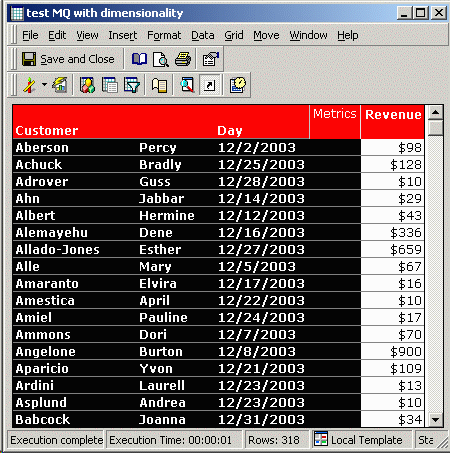
The results are sorted in alphabetical order by Customer to show that, as desired, each customer has only one row.
The SQL generated for the report shows why the results are correct. In the first pass (ZZMD00), the date of the last order for each customer in Connecticut is collected. ZZMQ01 joins this maximum date to the Day attribute lookup so that the maximum date can be used for joins in subsequent passes. If the database instance is configured to use join-92 syntax, a cross join will be generated; however, the cross join is immediately negated by the where clause, which functions as a correct join condition.
Finally, in the last pass, the metric is calculated but only for the customers and days identified in the second pass.
select a12.CUSTOMER_ID CUSTOMER_ID,
max(a11.ORDER_DATE) WJXBFS1
into #ZZMD00
from ORDER_FACT a11
join LU_ORDER a12
on (a11.ORDER_ID = a12.ORDER_ID)
join LU_CUSTOMER a13
on (a12.CUSTOMER_ID = a13.CUSTOMER_ID)
join LU_CUST_CITY a14
on (a13.CUST_CITY_ID = a14.CUST_CITY_ID)
where a14.CUST_STATE_ID in (7)
group by a12.CUSTOMER_ID
select pa1.CUSTOMER_ID CUSTOMER_ID,
a11.DAY_DATE DAY_DATE
into #ZZMQ01
from #ZZMD00 pa1
cross join LU_DAY a11
where (pa1.WJXBFS1 = a11.DAY_DATE)
select a12.CUSTOMER_ID CUSTOMER_ID,
max(a13.CUST_LAST_NAME) CUST_LAST_NAME,
max(a13.CUST_FIRST_NAME) CUST_FIRST_NAME,
a11.ORDER_DATE DAY_DATE,
sum(a11.ORDER_AMT) WJXBFS1
from ORDER_FACT a11
join LU_ORDER a12
on (a11.ORDER_ID = a12.ORDER_ID)
join #ZZMQ01 pa2
on (a11.ORDER_DATE = pa2.DAY_DATE and
a12.CUSTOMER_ID = pa2.CUSTOMER_ID)
join LU_CUSTOMER a13
on (a12.CUSTOMER_ID = a13.CUSTOMER_ID)
join LU_CUST_CITY a14
on (a13.CUST_CITY_ID = a14.CUST_CITY_ID)
where a14.CUST_STATE_ID in (7)
group by a12.CUSTOMER_ID,
a11.ORDER_DATE
drop table #ZZMD00
drop table #ZZMQ01
KB419457
