In the Tutorial project, the user needs to create a report, for example, Revenue by Category. It is known that there are four different category elements in the Category lookup table, but in the fact table there are more than four Category elements and the report needs to show all category elements, including those related to elements that are not present in the lookup table.
By default a report with the Category attribute and the Revenue metric would generate the SQL statement as shown below. This query does not return all desired elements of category from the Data Warehouse.
select a11.[CATEGORY_ID] AS CATEGORY_ID,
sum(a11.[TOT_DOLLAR_SALES]) AS Revenue
into [ZZEA00]
from [YR_CATEGORY_SLS] a11
group by a11.[CATEGORY_ID]
select distinct pa11.[CATEGORY_ID] AS CATEGORY_ID,
a12.[CATEGORY_DESC] AS CATEGORY_DESC0,
pa11.[Revenue] AS WJXBFS1
from ([ZZEA00] pa11
inner join [LU_CATEGORY] a12
on (pa11.[CATEGORY_ID] = a12.[CATEGORY_ID]))
To be able to view all elements of category, including those from the metric pass that are not present in the Category lookup, the SQL statement needs a left outer join clause.
To include the left outer join clause, follow the steps below:
1) From the Data menu, access the VLDB Properties option
2) In Joins, select Preserve all the final pass result elements. Clicking in Preserve all pass the final elements option
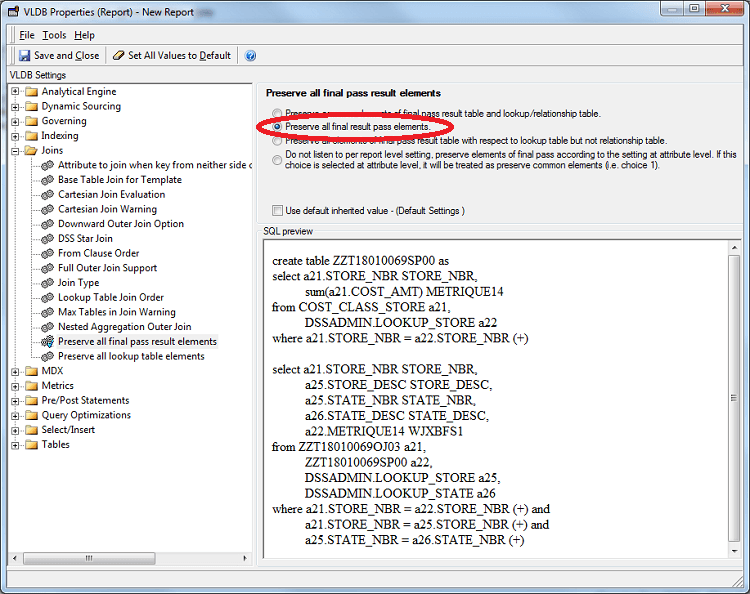
3) In Joins, select Join Type. Check the option according to the database used. After changing the options, check the query that will be created in SQL preview.
4) Click the Save and Close button.
This setting allows for outer joins from metric calculation passes to lookup tables in the final pass. With this change the below SQL will be seen.
select a11.[CATEGORY_ID] AS CATEGORY_ID,
sum(a11.[TOT_DOLLAR_SALES]) AS Revenue
into [ZZEA00]
from [YR_CATEGORY_SLS] a11
group by a11.[CATEGORY_ID]
select distinct pa11.[CATEGORY_ID] AS CATEGORY_ID,
a12.[CATEGORY_DESC] AS CATEGORY_DESC0,
pa11.[Revenue] AS WJXBFS1
from ([ZZEA00] pa11
left join [LU_CATEGORY] a12
on (pa11.[CATEGORY_ID] = a12.[CATEGORY_ID]))
As can be seen the join from the metric temp table ZZEA00 to the category lookup table is now a left outer join. This setting does not however allow for any lookup table used inside a metric calculation pass to use a left outer join. When a lookup table is used for filtering or for the attribute selection option inside a metric pass a left outer join may not be seen. This is because a left outer join inside the metric pass for a selected attribute ID column would leave the report with null attribute IDs which are not supported by Strategy in SQL. In that scenario the issue is best explained as a ragged hierarchy and the workarounds for ragged hierarchies should be used per the article KB6831. An example of SQL in that scenario is seen below where the subcategory fact table is used.
select a12.[CATEGORY_ID] AS CATEGORY_ID,
sum(a11.[TOT_DOLLAR_SALES]) AS WJXBFS1
into [ZZEA00]
from ([CITY_SUBCATEG_SLS] a11
inner join [LU_SUBCATEG] a12
on (a11.[SUBCAT_ID] = a12.[SUBCAT_ID]))
group by a12.[CATEGORY_ID]
select distinct pa11.[CATEGORY_ID] AS CATEGORY_ID,
a12.[CATEGORY_DESC] AS CATEGORY_DESC0,
pa11.[WJXBFS1] AS WJXBFS1
from ([ZZEA00] pa11
left join [LU_CATEGORY] a12
on (pa11.[CATEGORY_ID] = a12.[CATEGORY_ID]))
