EducationSoftwareStrategy.com
StrategyCommunity

Knowledge Base

Product

Community

Knowledge Base

TopicsBrowse ArticlesDeveloper Zone

Product

Download SoftwareProduct DocumentationSecurity Hub

Education

Tutorial VideosSolution GalleryEducation courses

Community

GuidelinesGrandmastersEvents
x_social-icon_white.svglinkedin_social-icon_white.svg
Strategy logoCommunity

© Strategy Inc. All Rights Reserved.

LegalTerms of UsePrivacy Policy
  1. Home
  2. Topics

KB4196: How to import users from a .udf file in the MicroStrategy Developer 10.x User Manager


Stefan Zepeda

Salesforce Solutions Architect • Strategy


SUMMARY: 
This document provides the format used when importing users into the metadata from a flat file.

  • Each line represents an entry of a user or a group.
  • Each field in the line must be kept, even if it is empty; otherwise the entry will be ignored.
  • The syntax of the line should exactly follow the format below:
    
    IsGroup:Login:Full Name:Description:group1,group2,...:xyz
    
    * IsGroup is a flag if equals:
    1(a group)Login and xyz fields will be ignored.
    0(a user)Login and Full name fields must be provided
    * x,y,z are flags:
    if x is 1 then the account is disabled.
    if y is 1 then user cannot change password and z is ignored.
    if z is 1 then user must change password at first 
    logon (it is recommended to use this option).
    * group1,group2 ... indicates the membership of the new user or group.

     
    Valid examples:
     
    
    1::MSTR:Whole Company::
    1::Technology:This is our technology group:MSTR:
    0:Joe:John Doe:Standard user: Standard group,Technology:000
    0:John:John Smith::MSTR,Public:110
    0:AdminTest:Mike John:The system administrator:MSTR,Technology:001
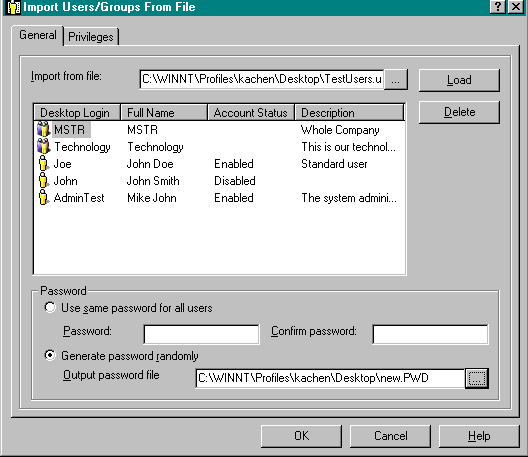
     
    • Save the file with the preceding syntax as a .udf file.
    • Right-click in the User Manager and select 'Import Users from File'.
    • In the Import Users/Groups From File window, select the .udf file from the 'Import from file' menu. Click on 'Load'.
       
ka02R000000kWkMQAU_0EM440000002GK8.gif

For more information, click on the Editor's Help button.


Comment

0 comments

Details

Knowledge Article

Published:

April 4, 2017

Last Updated:

June 22, 2017