EducationSoftwareStrategy.com
StrategyCommunity

Knowledge Base

Product

Community

Knowledge Base

TopicsBrowse ArticlesDeveloper Zone

Product

Download SoftwareProduct DocumentationSecurity Hub

Education

Tutorial VideosSolution GalleryEducation courses

Community

GuidelinesGrandmastersEvents
x_social-icon_white.svglinkedin_social-icon_white.svg
Strategy logoCommunity

© Strategy Inc. All Rights Reserved.

LegalTerms of UsePrivacy Policy
  1. Home
  2. Topics

KB419645: Reports executed in Microstrategy Developer containing consolidations and compound metrics return incorrect data


Stefan Zepeda

Salesforce Solutions Architect • Strategy


Some reports which contain a consolidation and a compound metric return incorrect data due to evaluation order.

SYMPTOM:
Some reports which contain a consolidation and a compound metric return incorrect data.
 
Perform the following steps to illustrate this issue:
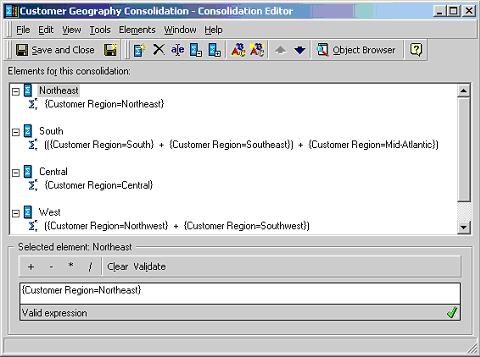
 

  • Create a consolidation called 'Customer Geography Consolidation', as shown below:
ka044000000kIqjAAE_0EM440000002G3Y.jpeg
  • Create a compound metric named 'Profit/Revenue' and enable the option "Allow Smart Metric".
  • Create a report with the 'Customer Geography Consolidation' and the metrics 'Profit,' 'Revenue,' and 'Profit/Revenue'.
  • Execute the report.

Observe that the data for metric 'Profit/Revenue' is incorrect:
 

ka044000000kIqjAAE_0EM440000002G3G.jpeg

 
CAUSE:
This issue is caused by an incorrect data set evaluation order. The Strategy Engine evaluates the compound metric first and the custom group second.
 
ACTION:
To resolve this issue, it is necessary to change the data evaluation order. To achieve this, perform the following:
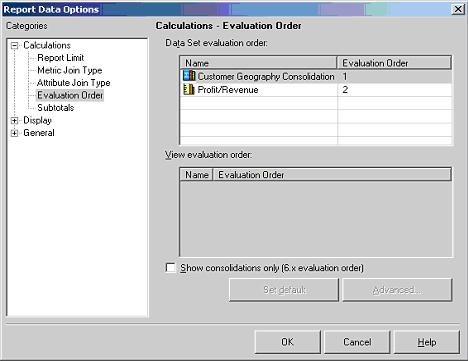
 

  • In Report Data Options > Evaluation Order, change the evaluation order so that the consolidation is evaluated first and the compound metric second, as shown in the screen shot below:
ka044000000kIqjAAE_0EM440000002G3b.jpeg
  • Re-execute the report.

The report will now return the correct data, as shown in the screen shot below:
 

ka044000000kIqjAAE_0EM440000002G3W.jpeg

 
KB419645


Comment

0 comments

Details

Knowledge Article

Published:

June 7, 2017

Last Updated:

January 1, 2019