EducationSoftwareStrategy.com
StrategyCommunity

Knowledge Base

Product

Community

Knowledge Base

TopicsBrowse ArticlesDeveloper Zone

Product

Download SoftwareProduct DocumentationSecurity Hub

Education

Tutorial VideosSolution GalleryEducation courses

Community

GuidelinesGrandmastersEvents
x_social-icon_white.svglinkedin_social-icon_white.svg
Strategy logoCommunity

© Strategy Inc. All Rights Reserved.

LegalTerms of UsePrivacy Policy
  1. Home
  2. Topics

KB41967: No projects available for this Mobile Server when setting the Connectivity Settings on MicroStrategy Mobile 9.0.1m and newer


Community Admin

• Strategy


When setting up a new project in the Connectivity Settings of MicroStrategy Mobile 9.0.1m and newer, the Configure New Projects option shows the message that no projects are available and the currently configured project displays as Not Connected.

SYMPTOM:
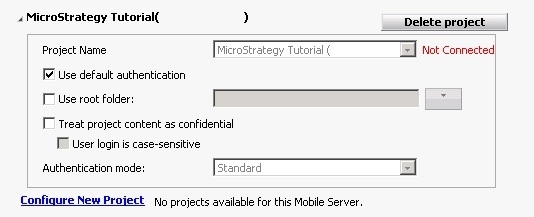
When setting up a new project in the Connectivity Settings of Strategy Mobile 9.0.1m and newer, the Configure New Projects option shows the message below that no projects are available and the currently configured project displays as Not Connected.
 

ka04W000000OddpQAC_0EM440000002AEk.jpeg


Project Name Strategy Tutorial Not Connected.
Configure New Project No projects available for this Mobile Server.
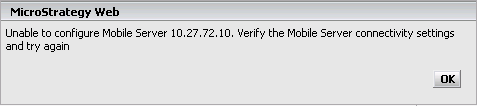
 
After clicking on the Configure New Project link, the message below is displayed on the screen:
 

ka04W000000OddpQAC_0EM440000002AEm.png


Unable to configure Mobile Server IPXX.XX.XX. Verify the Mobile Server connectivity settings and try again.
 
 
This issue happens even if the Intelligence Server is connected to the Strategy Mobile Server.
 
CAUSE:
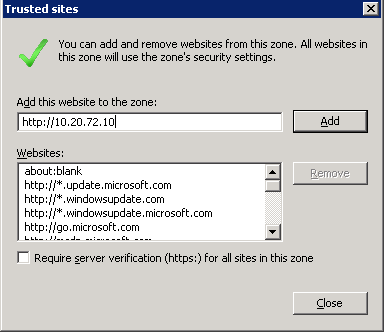
A possible cause is that the Strategy Mobile Server’s URL was not set as a trusted site in Internet Explorer 8 or 9.
 
ACTION:

  •  Open the Internet options.
  • Click on the Security tab.
  • Click on Trusted Sites.
  • Click the Sites button.
  • Add the IP Address of the Strategy Mobile 9.0.1m Server.
ka04W000000OddpQAC_0EM440000002AEp.png
  • Close
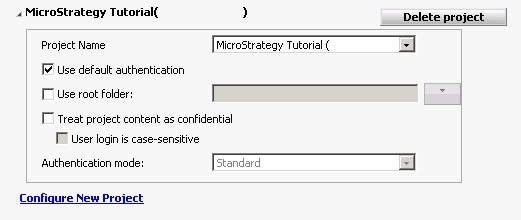
  • Configure the Mobile Project again.
ka04W000000OddpQAC_0EM440000002AEu.jpeg


Comment

0 comments

Details

Knowledge Article

Published:

April 10, 2017

Last Updated:

April 10, 2017