EducationSoftwareStrategy.com
StrategyCommunity

Knowledge Base

Product

Community

Knowledge Base

TopicsBrowse ArticlesDeveloper Zone

Product

Download SoftwareProduct DocumentationSecurity Hub

Education

Tutorial VideosSolution GalleryEducation courses

Community

GuidelinesGrandmastersEvents
x_social-icon_white.svglinkedin_social-icon_white.svg
Strategy logoCommunity

© Strategy Inc. All Rights Reserved.

LegalTerms of UsePrivacy Policy
  1. Home
  2. Topics

KB419700: Searching for ‘[object name]’ resulted in no matches.” error message appears when attempting to create a filter in MicroStrategy Command Manager 9.x and 10.x.


Stefan Zepeda

Salesforce Solutions Architect • Strategy


This knowledge base article describes an issue that occur in command manager when creating a filter object with an attribute element which include special characters such as a blank in the expression

SYMPTOM:
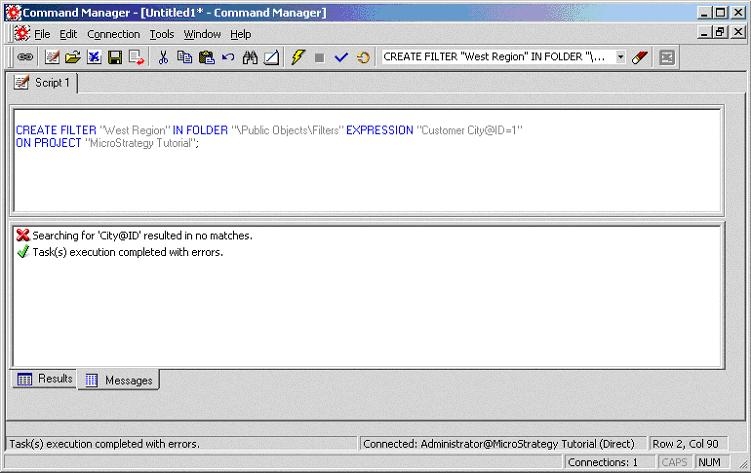
When users execute a script which creates a filter using Strategy Command Manager, the "Searching for '' resulted in no matches." error message appears. In the example screen shot below, the following script was used to obtain this error:


CREATE FILTER "West Region" IN FOLDER "\Public Objects\Filters"
EXPRESSION "Customer City@ID=1" ON PROJECT "Strategy Tutorial";
ka02R000000kV7OQAU_0EM440000002G5j.jpeg


Searching for '' resulted in no matches. Task(s) execution completed with errors.


CAUSE:
The script doesn't use correct syntax while building the expression. Object names which include special characters such as a blank, must be enclosed between "" or square brackets, otherwise the parser only recognizes part of the object name and will not find them appropriately.
Syntax conventions for building expressions in Strategy Command Manager are documented in CMMFEG.doc, saved under \Program Files\Strategy\Administrator\Command Manager. For more details about object names, refer to section 1.2.2 of this document.
 
ACTION:
Enclose the object name, in this case 'Customer City', in the expression between "" or []. The following is the modified script:

CREATE FILTER "West Region" IN FOLDER "\Public Objects\Filters"
EXPRESSION "[Customer City]@ID=1" ON PROJECT "Strategy Tutorial";


This issue is logged as SCOPUS ID 211896 and KB419700 KB419700


Comment

0 comments

Details

Knowledge Article

Published:

June 19, 2017

Last Updated:

November 13, 2018