EducationSoftwareStrategy.com
StrategyCommunity

Knowledge Base

Product

Community

Knowledge Base

TopicsBrowse ArticlesDeveloper Zone

Product

Download SoftwareProduct DocumentationSecurity Hub

Education

Tutorial VideosSolution GalleryEducation courses

Community

GuidelinesGrandmastersEvents
x_social-icon_white.svglinkedin_social-icon_white.svg
Strategy logoCommunity

© Strategy Inc. All Rights Reserved.

LegalTerms of UsePrivacy Policy
  1. Home
  2. Topics

KB419726: How are MicroStrategy Objects assigned Global Unique Identifiers in MicroStrategy Platform?


Stefan Zepeda

Salesforce Solutions Architect • Strategy


This knowledge base article explains how MicroStrategy objects are assigned Global Unique Identifiers (GUID).

SYMPTOM:
In order to distinguish Strategy objects, they are assigned a Global Unique Identifier (GUID). This is visible by right-clicking on an object and viewing the properties:
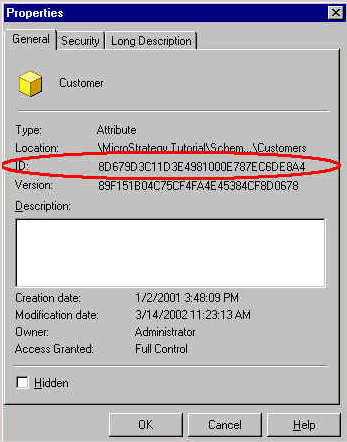
ka02R000000kV7NQAU_0EM440000002G7F.gif

 
This ID number is generated based on a combination of the following:

  • Date/time of the object created
  • Machine address of the network card in the machine
  • Sequence ID
  • Random number

 
KB419726


Comment

0 comments

Details

Knowledge Article

Published:

June 2, 2017

Last Updated:

November 13, 2018