Apply functions can be used in the attribute editor to provide access to functionality that is not standard in Strategy, but available from the Relational Database Management System (RDBMS), such as the special functions or syntactic constructs provided by various RDMBS platforms.
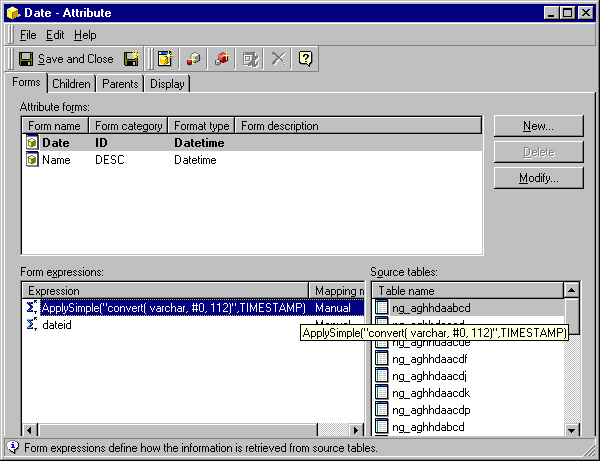
The functionality of Apply functions is provided by wrapping the expression, as a string, inside a dedicated (Apply) function call. To provide a reasonable level of generality, the feature is based on a 'pattern and arguments' scheme. The types of arguments determine how the parameter markers inside the pattern are replaced. Also, the particular Apply function used in the expression determines how the results are utilized by the system. The engine uses the information received in the pattern 'as is' to generate commands for the RDBMS, without interpreting its semantics, relying on the user knowledge of the RDBMS.
The syntax is as follows:
Grammar:
PassThroughExpr = ApplyFunName (Pattern, Arg, Arg, …, Arg)
Pattern = String (containing parameter markers:  #0, #1, …)
Arg = Any argument appropriate for regular, predefined functions with the same type as that
represented by ApplyFunName and applied in the same context.
The Apply Functions:
Each type of custom sub-expression/function call is represented by a specialized Apply function. There are several predefined Apply functions that can be used where regular predefined functions of the same type are used.
The Pattern:
The string pattern is similar to the ones used internally by the engine for regular predefined functions. The string pattern contains parameter markers flagged by '#' characters and indexed from 0 (e.g., #0, #1, #2, etc.). The engine replaces parameter markers by actual arguments according to the following tenets:
The Arguments:
The number of arguments is variable and is not checked until the replacement of parameter markers. When parsing, accepted argument types are:
Typically, patterns represent custom function calls (possibly with a special syntax) or 'custom SQL,' but, since patterns are not analyzed, there is no limit to what they can be, as long as the result returned is compatible with what the analytical engine expects.
EXAMPLES:
If the engine has to generate the following to be sent to the RDBMS
SELECT MAX({FN CONVERT(INT, {FN DATEDIFF(MYDATE,STARTDATE)})})
MAX(ApplySimple("{FN CONVERT(INT,{FN DATEDIFF(#0, #1)})}",MYDATE,STARTDATE))
MYAGGFUN, an expression for the RDBMS such as the following:
 MYAGGFUN( FACT1 + FACT2)
can be specified by the user as:
 ApplyAgg( "MYAGGFUN( #0 + #1 )", FACT1, FACT2 )
 MYCOMPARISON( ATTRIBUTE1_ID, ATTRIBUTE2_ID )
specify as a filter expression:
 ApplyComparison("MYCOMPARISON(#0, #1)", Attribute1@ID, Attribute2@ID)
ApplyComparison("#0 >o< #1", Attribute1@ID, Attribute2@ID )
