SYMPTOM:
In a transaction services document, a submit button is configured with the option "Refresh the current document" checked. The document will get refreshed automatically after the submit button is clicked.
However, when the document is run using the URL API with the parameter "hiddensections=dockTop", the document cannot get refreshed automatically after the data is submitted.
An example of the URL:
http://<web server>/MicroStrategy/asp/Main.aspx?&evt=2048001&src=Main.aspx.2048001&visMode=0&documentID=FB8DB51247AE6A305A4239B9C9A22EFB&hiddensections=dockTop
STEPS TO REPRODUCE:
Follow the steps below to reproduce the issue with Strategy Tutorial project:
1. Create a transaction services document with a submit button.
2. Check the option "Refresh the current document" for the submit button, as shown below:
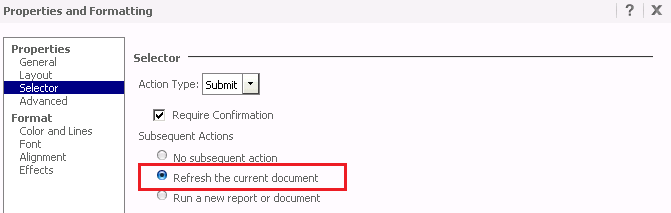
3. Use the URL API with "hiddensections=dockTop" to run the document. Note that the document cannot get refreshed automatically after the data is submitted.
4. Run the document directly via Strategy Web. Note that the document gets refreshed automatically after the data is submitted.
CAUSE:
This is a known issue in Strategy Web 9.3.1.
ACTION:
Contact Strategy Technical Support for the latest status of the issue.
KB420510
