SYMPTOM:
In Strategy Developer 9.4.x-10.x., there is a setting called 'Export this Report Automatically'. This is a setting that can be enabled on a report-by-report basis, and can be accessed by doing the following:
Within the 'Export Options' Menu, ensure that 'Application' is set to 'MS Excel Worksheet'. Also ensure that the 'Export this Report Automatically' setting is enabled, a Valid File Destination is present, and a Location is defined (if required).
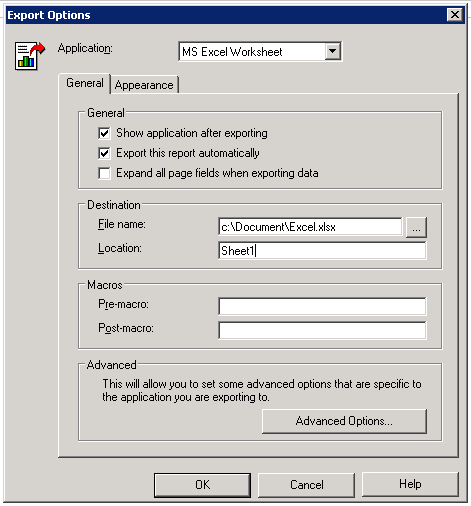
If this report is scheduled to be delivered to a user's History List Inbox, the existing Excel file is not updated/overwritten, unless a recipient does one of the following:
This could be an issue for users who are utilizing the 'location' feature available when exporting to Excel, a feature which allows a user to define one Excel sheet of the entire Excel file, to be written to.
CAUSE:
This is currently working as Designed. The intended functionality of the setting ''Export this Report Automatically" is described below:
"If you send a report to your History List with this setting selected, and then read the report from your History List, the report is automatically exported to the application that you selected."
Note: This functionality is designed for all exporting formats, not just Excel.
ACTION:
An enhancement request was logged to provide the above mentioned functionality. After careful consideration, however, Strategy decided that this issue isn't part of the foreseeable development roadmap of the platform so it won't be implemented.
Please use the Ideas Exchange if you would like this to be considered for future versions.
https://success.microstrategy.com/s/topic/0TO44000000FljAGAS/Exporting%20-%20U084?t=1492181877337&tabset-215d6=4aa55
WORKAROUND:
Strategy Distribution Services 9.4.x-10.x does not have the 'location' feature when creating Excel file subscriptions of reports. For this reason, a report with a defined 'location' cannot simply be done as a file subscription. Other formats may not suffer from this issue, and can be scheduled as a file Subscription instead of sent to History List.
For an Excel file subscription that requires the defined 'location', users can utilize a multi-layout document created through Strategy Web 9.4.x-10.x and can create a file subscription for this new document. However, this document must contain all required 'sheets' of the Excel file, as this will overwrite the entire Excel file each time the subscription is executed.
