EducationSoftwareStrategy.com
StrategyCommunity

Knowledge Base

Product

Community

Knowledge Base

TopicsBrowse ArticlesDeveloper Zone

Product

Download SoftwareProduct DocumentationSecurity Hub

Education

Tutorial VideosSolution GalleryEducation courses

Community

GuidelinesGrandmastersEvents
x_social-icon_white.svglinkedin_social-icon_white.svg
Strategy logoCommunity

© Strategy Inc. All Rights Reserved.

LegalTerms of UsePrivacy Policy
  1. Home
  2. Topics

KB42078: Attribute header wrap is not applied to the last attribute of the grid in the email body in MicroStrategy Narrowcast 9.x


Community Admin

• Strategy


This article explains why an attribute header wrap is not applied to the last attribute of the grid in the email body in MicroStrategy Narrowcast 9.x

SYMPTOM:
Attribute header wrap is not applied to the last attribute of the grid in the email body in Strategy Narrowcast.
STEPS TO REPRODUCE:
ka04W000000OdqEQAS_0EM4400000029fw.jpeg


ka04W000000OdqEQAS_0EM4400000029fo.jpeg

NOTE: In order to make sure this is not an attribute specific issue, change the position of the attributes in Developer, as shown below:
ka04W000000OdqEQAS_0EM4400000029fy.jpeg

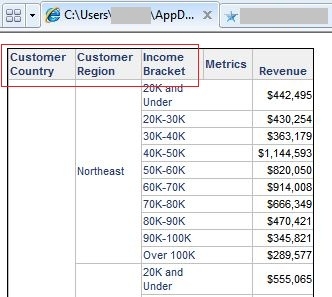
Save and close the report. And run the service again. The grid shows that wrap is still not applied to the last attribute, as shown below:

ka04W000000OdqEQAS_0EM4400000029fi.jpeg
  • In Developer Tutorial project, create a report with attributes ,  and in row, and a metric in column.
  • Run the report in Grid View. Go to Menu -> Grid, and disable the "Automatic Column Widths" option.
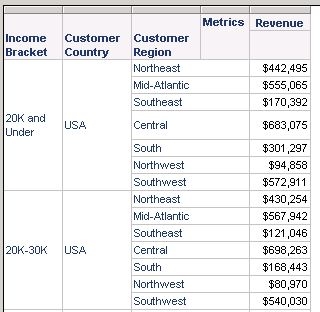
  • Change the width of the attributes to have wrap applied to all the attribute headers, as shown below:
ka04W000000OdqEQAS_0EM4400000029fu.jpeg
  • Save and close the report.
  • In Strategy Narrowcast, using the Tutorial System as an example.
  • Create a new service and select the delivery method as Email (SMTP).
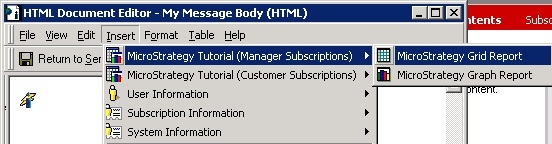
  • Define message body. Directly insert a Grid Report from the Information Source, as shown below:
  • Use Static Subscription and define the subscription set to send the email.
  • Finish service creation.
  • Right mouse click on the service -> Run Immediately.
  • Get the email with the report grid as message body. Notice that the wrap is not applied to the last attribute header, as shown below:

CAUSE:
This is a known issue with Strategy Narrowcast 9.x
ACTION:
Contact Strategy Technical Support for an update of the issue.
WORKAROUND:
Add the report into the Email Attachment, with following steps:
  • In Narrowcast Service Wizard, Define Attachments.
  • Select "Create a new Narrowcast Server document" -> HTML Content
  • Insert the Grid Report from the Information Source directly.
  • Save the service and run the service immediately.
  • Get the email and check the report in the attachment. Notice that the wrap is applied to all of the attribute headers correctly, as shown below:
ka04W000000OdqEQAS_0EM4400000029fs.jpeg

Comment

0 comments

Details

Knowledge Article

Published:

June 15, 2017

Last Updated:

June 15, 2017