EducationSoftwareStrategy.com
StrategyCommunity

Knowledge Base

Product

Community

Knowledge Base

TopicsBrowse ArticlesDeveloper Zone

Product

Download SoftwareProduct DocumentationSecurity Hub

Education

Tutorial VideosSolution GalleryEducation courses

Community

GuidelinesGrandmastersEvents
x_social-icon_white.svglinkedin_social-icon_white.svg
Strategy logoCommunity

© Strategy Inc. All Rights Reserved.

LegalTerms of UsePrivacy Policy
  1. Home
  2. Topics

KB42080: "An object name cannot contain the following characters: \ [ ]" error appears when unchecking and applying "Replace dynamic text" option for feature Dynamic Metric Aliasing in MicroStrategy Web 9.3.0


Community Admin

• Strategy


"An object name cannot contain the following characters: \ " error appears when unchecking and applying "Replace dynamic text" option for feature Dynamic Metric Aliasing in MicroStrategy Web 9.3.0

 
SYMPTOM:
 
"An object name cannot contain the following characters: \ " error appears when unchecking and applying "Replace dynamic text" option for feature Dynamic Metric Aliasing in Strategy Web 9.3.0, as shown below:

ka04W000000OfWrQAK_0EM4400000026uT.jpeg

Sample Code/Error
An object name cannot contain the following characters: " \ "
 
 
STEPS TO REPRODUCE:

  • Following the steps as described in TN 40091: New Feature in MicroStrategy Web 9.3.0: Dynamic Metric Aliasing, to apply dynamic metric alias in Strategy Web 9.3.0. 
  • Save and re-run the report, and answer the prompt. The dynamic metric aliasing is applied to the metric .
  • Right mouse click on the metric header and select "Rename/Edit", uncheck the "Replace dynamic text" option and click on Apply button, as shown below:
ka04W000000OfWrQAK_0EM4400000026uQ.jpeg
  • The error "An object name cannot contain the following characters: \ " appears as shown in the symptom.

 
CAUSE:
 
This is by design in Strategy Web 9.3.0. The characters "\ " can be recognized in dynamic metric aliasing. But when the "Replace dynamic text" option is unchecked, the metric alias is regarded as a static alias, which does not allow the name to contain characters such as "\ ".
 
 
ACTION:
 
Modify the metric alias name without any unsupported characters, no matter the "Replace dynamic text" option is checked or not, as shown below:
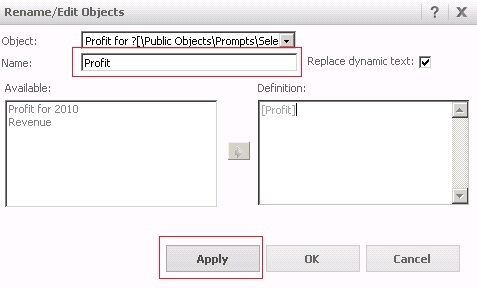
ka04W000000OfWrQAK_0EM4400000026uU.jpeg

 
Click on Apply to save the change and the error will not appear.


Comment

0 comments

Details

Knowledge Article

Published:

March 31, 2017

Last Updated:

March 31, 2017