EducationSoftwareStrategy.com
StrategyCommunity

Knowledge Base

Product

Community

Knowledge Base

TopicsBrowse ArticlesDeveloper Zone

Product

Download SoftwareProduct DocumentationSecurity Hub

Education

Tutorial VideosSolution GalleryEducation courses

Community

GuidelinesGrandmastersEvents
x_social-icon_white.svglinkedin_social-icon_white.svg
Strategy logoCommunity

© Strategy Inc. All Rights Reserved.

LegalTerms of UsePrivacy Policy
  1. Home
  2. Topics

KB42082: How to use derived metrics to concatenate two attribute forms of the report in MicroStrategy 9.4.x-10.x?


Stefan Zepeda

Salesforce Solutions Architect • Strategy


This knowledge base article documents how to use derived metrics to concatenate two attribute forms of the report in MicroStrategy 9.4.x-10.x.

In some business scenarios, it is required to use derived metrics to concatenate two attribute forms of the report. Two examples of the scenarios that may need to use derived metrics to concatenate two attribute forms of the report:

  1. The report is based on an Intelligent Cube but the user is not allowed to modify and republish the cube.
  2. The report is a Freeform SQL report and it is not expected to modify the SQL.

 
For the steps below to achieve the requirement:
  • In Strategy Tutorial (3-Tier) project, create a report with attributes and .
  • Run the report in Grid View.
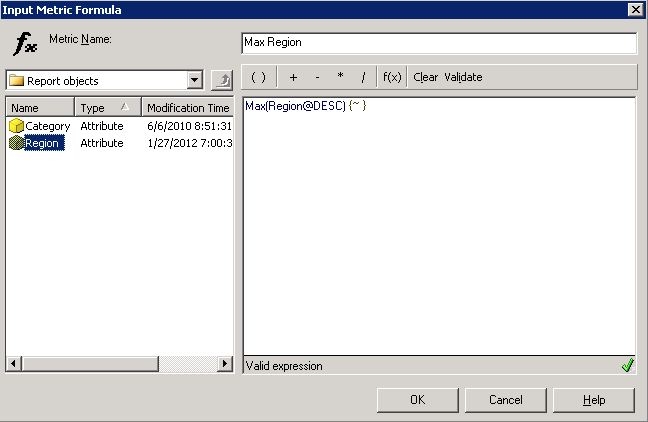
  • Go to Menu -> Insert -> New Metric, and enter the formula as shown below:
ka02R000000kXDbQAM_0EM440000002D0J.jpeg
  • 
    Max(Region@DESC) {~ }


    NOTE: Use Max() function to transfer an attribute form into a derived metric which can be recognized by the string functions such as Concat().
  • Click on OK to save the derived metric.
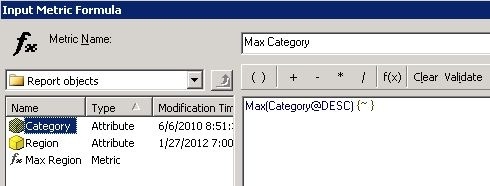
  • Insert another derived metric, as shown below:
ka02R000000kXDbQAM_0EM440000002D07.jpeg
  • 
    Max(Category@DESC) {~ }


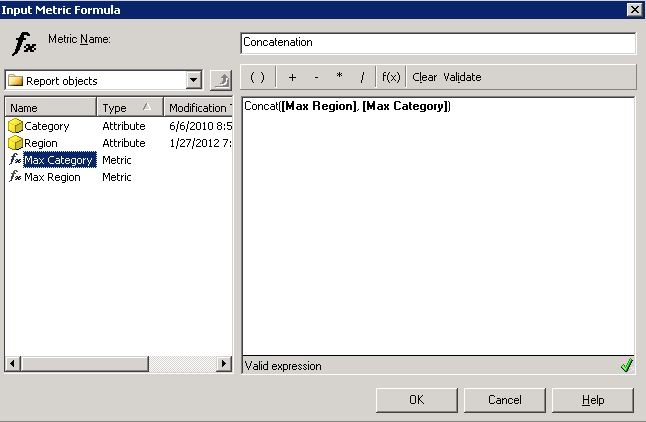
  • Insert a third derived metric to do the concatenation. Select String Functions -> Concat(), and input the formula as shown below:
ka02R000000kXDbQAM_0EM440000002D0K.jpeg
  • 
    Concat([Max Region], [Max Category])


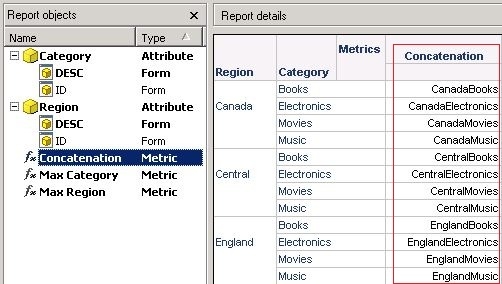
  • The new derived metric can display the concatenation of the two attribute forms, as shown below:
ka02R000000kXDbQAM_0EM440000002D0G.jpeg

Comment

0 comments

Details

Knowledge Article

Published:

April 5, 2017

Last Updated:

April 5, 2017