SYMPTOM
Not all the projects are shown in the document cache monitor option when 12 projects are loaded in Strategy Developer 9.4.1 and 10.x.
STEPS TO REPRODUCE
1. Launch Desktop and load exactly 12 projects.
2. Go to Administration>System Monitors>Caches and click "Documents". In the windows prompt, the project of "Sales Force Analysis Module" does not show and no scroll bar is available as below:
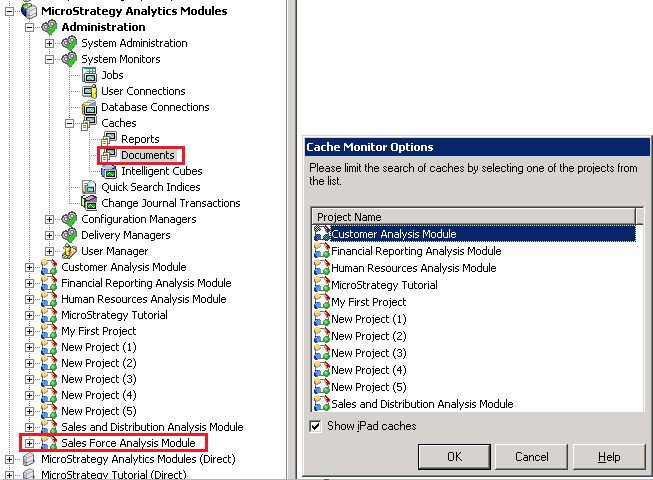
Note: this issue only happens when there are 12 projects loaded.
CAUSE
This is a known issue in Strategy Developer 9.4.1 and 10.x
ACTION
Contact Strategy Technical Support for an update on the status of this issue.
WORKAROUND
There are two options:
The Strategy Internal Reference Number for the issue discussed in this technical note is 701880
