EducationSoftwareStrategy.com
StrategyCommunity

Knowledge Base

Product

Community

Knowledge Base

TopicsBrowse ArticlesDeveloper Zone

Product

Download SoftwareProduct DocumentationSecurity Hub

Education

Tutorial VideosSolution GalleryEducation courses

Community

GuidelinesGrandmastersEvents
x_social-icon_white.svglinkedin_social-icon_white.svg
Strategy logoCommunity

© Strategy Inc. All Rights Reserved.

LegalTerms of UsePrivacy Policy
  1. Home
  2. Topics

KB42115: Database connection failed with error "Connection refused. Verify Host Name and Port Number" in MicroStrategy Cloud Express


Community Admin

• Strategy


SYMPTOM:
 
Database connection failed with error "Connection refused. Verify Host Name and Port Number" in Strategy Cloud Express, as shown below:
 

ka04W000000OfHCQA0_0EM440000002HN2.png


com.Strategy.webapi.MSTRWebAPIException: (Database error <5>: Connect failed. Error type: Odbc error. Odbc operation attempted: SQLDriverConnect. Connection refused. Verify Host Name and Port Number. Invalid attribute in connection string: USEWINDOWSAUTHENTICATIONFORLOGIN.)
 
CAUSE:
 
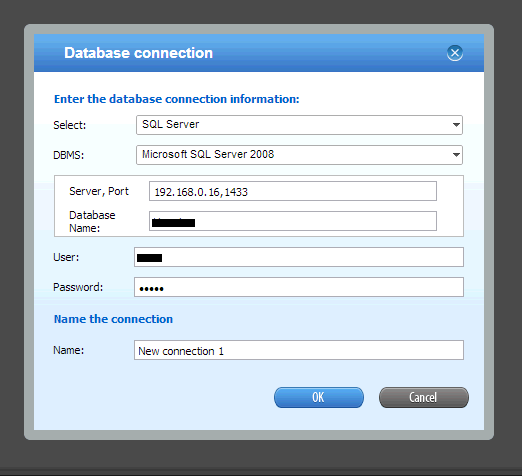
An internal IP address is used "Server, Port" field in Database connection in Cloud Express, as shown below:
 

ka04W000000OfHCQA0_0EM440000002HN9.png

 
ACTION:
 
Use a public IP address in "Server, Port" field in Database connection.


Comment

0 comments

Details

Knowledge Article

Published:

May 5, 2017

Last Updated:

May 5, 2017