EducationSoftwareStrategy.com
StrategyCommunity

Knowledge Base

Product

Community

Knowledge Base

TopicsBrowse ArticlesDeveloper Zone

Product

Download SoftwareProduct DocumentationSecurity Hub

Education

Tutorial VideosSolution GalleryEducation courses

Community

GuidelinesGrandmastersEvents
x_social-icon_white.svglinkedin_social-icon_white.svg
Strategy logoCommunity

© Strategy Inc. All Rights Reserved.

LegalTerms of UsePrivacy Policy
  1. Home
  2. Topics

KB42127: "Some problems were found with one or more of your selections." error message appears when selecting saved personal answers for dynamic date prompts in MicroStrategy Web


Community Admin

• Strategy


When selecting previously saved personal answers to multiple date prompts using a static date in MicroStrategy Web, an error message appears saying

SYMPTOM:
When selecting previously saved personal answers to multiple date prompts using a static date in Strategy Web 9.2.x and 9.3.x, an error message appears saying
Sample Code/Error
"Some problems were found with one or more of your selections. Please review your answers and follow the instructions marked by a red flag." 
 
and the flag says:
Sample Code/Error
"You have entered an invalid answer. Please enter a value of the correct data type." 
 
STEPS TO REPRODUCE
 
To reproduce in Strategy Tutorial Project,
  • In Strategy Desktop, create a filter.
  • Add an attribute qualification on the Day attribute.
  • When defining the filter, qualify on ID, use the Operator "Between", and for Value - click "calendar".
  • select dynamic date minus 24 months for the first value.
  • For the second value, click the calendar and select dynamic date minus 23 months.
  • Click on the prompt button next to each value.
  • Enable personal answers, select Multiple. Save and Close.
  • Create a report with the Day attribute.
  • Add the filter defined in Step 1 to the Report Filter.
  • Execute the report in Strategy Web.
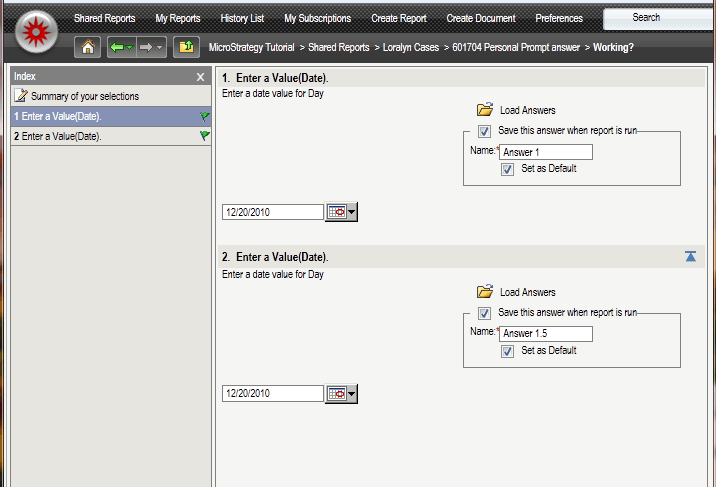
  • Click the button to "Save this answer when report is run" and "Set as default". For name, save as Answer 1 and Answer 1.5, as shown below. 

ka04W000000OgEFQA0_0EM4400000026td.png
  • Hit Run Report and note that the report works properly.
  • Re-prompt the report and select a different date in each prompt, like shown below.

ka04W000000OgEFQA0_0EM4400000026tf.png
  • Save these answers again and set them as default.
  • Name these answers as Answer 2 and Answer 2.5.
  • Hit Run Report and note that everything works properly.                                                                         
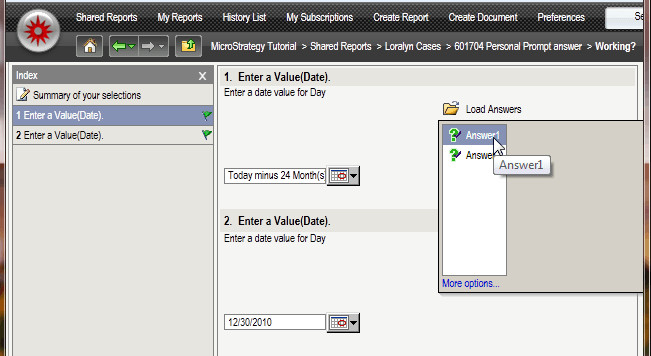
  • Re-prompt the report a second time and click on the folders to "Load Answers".
  • Select Answers 1 and 1.5.
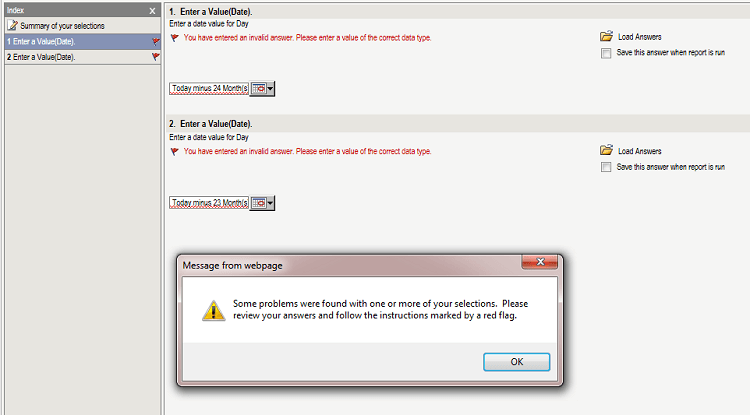
  • Hit Run Report. Note the error message shown below will display.
ka04W000000OgEFQA0_0EM4400000026tg.png


"Some problems were found with one or more of your selections. Please review your answers and follow the instructions marked by a red flag."

"You have entered an invalid answer. Please enter a value of the correct data type."


CAUSE:
 
This is a known issue in Strategy Web 9.2.1, 9.2.1m, and 9.3.  The prompt answer is looking for a date like "12/1/12" but instead, a string such as "Today minus 24 months" answers the prompt based on the personal answer previously saved.
 
ACTION:
 
Contact Strategy Technical Support for an update on this issue.


Comment

0 comments

Details

Knowledge Article

Published:

June 21, 2017

Last Updated:

June 21, 2017