EducationSoftwareStrategy.com
StrategyCommunity

Knowledge Base

Product

Community

Knowledge Base

TopicsBrowse ArticlesDeveloper Zone

Product

Download SoftwareProduct DocumentationSecurity Hub

Education

Tutorial VideosSolution GalleryEducation courses

Community

GuidelinesGrandmastersEvents
x_social-icon_white.svglinkedin_social-icon_white.svg
Strategy logoCommunity

© Strategy Inc. All Rights Reserved.

LegalTerms of UsePrivacy Policy
  1. Home
  2. Topics

KB42166: A grid object disappears in flash mode on a document in MicroStrategy Web 9.3.0 when the grid only contains objects in the columns, doesn't show column headers, and is targeted by a selector


Community Admin

• Strategy


A grid object disappears in flash mode on a document in MicroStrategy Web 9.3.0 when the grid only contains objects in the columns, doesn't show column headers, and is targeted by a selector

SYMPTOM:
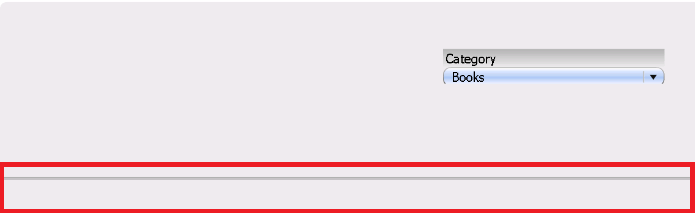
In Strategy Web 9.3.0, if a grid inside a document contains all objects, i.e. attributes and metrics, in the columns. If this grid is set to not show column headers, and also targeted by a selector, the grid will display correctly in DHTML modes, but will disappear completely in Flash mode, like shown below.
ka04W000001MKrTQAW_0EM4400000026ss.png

 
STEPS TO REPRODUCE:
Follow these steps in Strategy Tutorial 9.3.0 to reproduce:
  • Create a report with two attributes and one metric.
  • Create a document with this report as a dataset.
  • Add a grid to the document that has both the attribute and the metric in the columns.
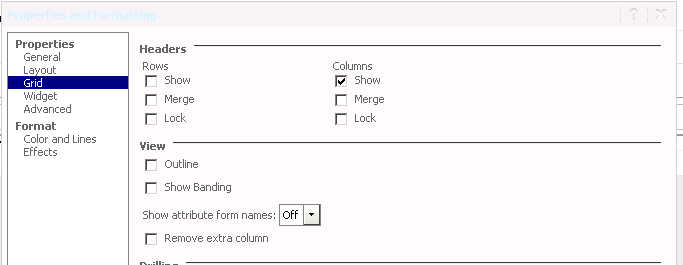
  • Right click the grid, go to properties and formatting, Click Grid, and uncheck "Show Row Headers", as shows below:
     
ka04W000001MKrTQAW_0EM4400000026so.png
  • Create a dropdown selector targeting the grid, with the attribute not used in the grid as the selector source.
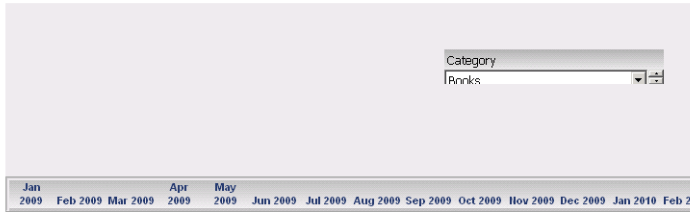
  • Run this dashboard in Interactive mode and notice that the grid displays fine, as shown below:
     
    Note: One attribute is in the selector (Category), the other one is on the columns (Month).
     
ka04W000001MKrTQAW_0EM4400000026sq.png
  • Run the dashboard in Flash mode and notice that the grid disappears, with only an outline box where it is supposed to be, as shown below:
     
ka04W000001MKrTQAW_0EM4400000026ss.png

 
CAUSE:
This is a known issue in Strategy Web 9.3.0.
ACTION:
Contact Strategy Technical Support for an update on this issue.
WORKAROUND:

  1. If possible, run the document in DHTML modes, or
  2. Show row headers on the grid.


Comment

0 comments

Details

Knowledge Article

Published:

April 5, 2017

Last Updated:

April 5, 2017