EducationSoftwareStrategy.com
StrategyCommunity

Knowledge Base

Product

Community

Knowledge Base

TopicsBrowse ArticlesDeveloper Zone

Product

Download SoftwareProduct DocumentationSecurity Hub

Education

Tutorial VideosSolution GalleryEducation courses

Community

GuidelinesGrandmastersEvents
x_social-icon_white.svglinkedin_social-icon_white.svg
Strategy logoCommunity

© Strategy Inc. All Rights Reserved.

LegalTerms of UsePrivacy Policy
  1. Home
  2. Topics

KB42168: Image objects using a URL path with backslashes exports to PDF with a red "X" box but displays correctly in Interactive View for MicroStrategy Web 9.x - 10.x


Stefan Zepeda

Salesforce Solutions Architect • Strategy


This technical note outlines an issue observed in MicroStrategy Web, where images do not display correctly when exporting to PDF.

SYMPTOM:
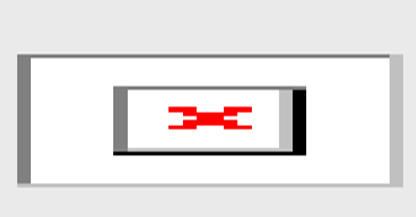
In Strategy Web 9.x - 10.x image objects using a URL path exports to PDF with a red "X" as shown below, but displays correctly in Interactive View.
ka02R000000kc37QAA_0EM440000002CzE.png


STEPS TO REPRODUCE:

  • Create a dashboard in Strategy Web.
  • Insert an image object and have it point to http:\\www.Strategy.com\graphics\mstr-426x70-trans.png (with backslashes).
  • Run the dashboard in Interactive Mode. Notice that the image shows up correctly like shown below:
ka02R000000kc37QAA_0EM440000002CzG.png
  • Now export the dashboard to PDF.  It should display the red "X" box instead of the image.

 
CAUSE:
The syntax for the path is incorrectly using backslashes instead of forward slashes.
 
ACTION:
Append the URL so that it contains forward-slashes instead of backslashes like shown here: http://www.Strategy.com/graphics/mstr-426x70-trans.png.


Comment

0 comments

Details

Knowledge Article

Published:

May 31, 2017

Last Updated:

May 31, 2017