SYMPTOM:
When running Strategy Web 9.3 in a Chrome browser the error show below appears when linking to prompted document using URL API and passing prompts answers from many different selectors or many selections from one selector. In Internet Explorer, the link does not throw the error below but just doesn't work.
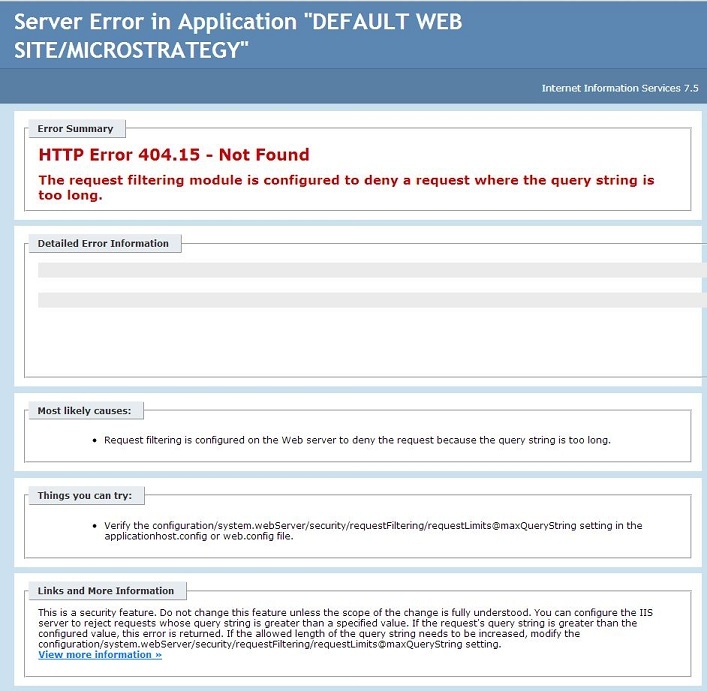
Server Error in Application "DEFAULT WEB SITE/Strategy"
Error Summary
HTTP Error 404.15 - Not Found
The request filtering module is configured to deny a request where the query string is too long.
STEPS TO REPRODUCE:
CAUSE:
This is a known in Strategy 9.3 where very long URL strings that are past a browser's limitations when passing prompt answers through URL API. This issue has been logged to technology.
ACTION:
Strategy will continue to investigate and post updates as soon as they are available.
WORKAROUND:
1.Have users select smaller number of selections.
2.Implement a third-party URL shortener to shorten the URL string such as goo.gl.
3.Append the web.config file within \MicroStrategy\Web ASPx to increase the value of maxQueryString="length".
NOTE: This workaround does not apply to Internet Explorer browsers because they have a set URL string limit.
Third Party Software Installation WARNING
The third-party product(s) discussed in this technical note is manufactured by vendors independent of Strategy. Strategy makes no warranty, express, implied or otherwise, regarding this product, including its performance or reliability.
