EducationSoftwareStrategy.com
StrategyCommunity

Knowledge Base

Product

Community

Knowledge Base

TopicsBrowse ArticlesDeveloper Zone

Product

Download SoftwareProduct DocumentationSecurity Hub

Education

Tutorial VideosSolution GalleryEducation courses

Community

GuidelinesGrandmastersEvents
x_social-icon_white.svglinkedin_social-icon_white.svg
Strategy logoCommunity

© Strategy Inc. All Rights Reserved.

LegalTerms of UsePrivacy Policy
  1. Home
  2. Topics

KB42199: When trying to send email subscriptions using MicroStrategy Distribution Services in MicroStrategy 10.x, a number of failed-to-deliver emails are sent to the administrator


Community Admin

• Strategy


This technote explains the behaviour where failed deliveries are being sent to the administrator.

SYMPTOM:
When trying to send emails using Distribution Services in Strategy 9.x, many delivery failed emails are sent to the administrator. The following error can be seen in the DSSError.log


Distribution Service: MSIDeliveryEngine::hDelivery: Unknown Delivery Failed.
Error string from ExecuteMultiProcess No more Mail Exchange Servers to try 
Unknown error

  
CAUSE:
One of the devices that is being used has a different IP Address/Server Name than the one to which Strategy needs to resolve. Devices can be found under Administration > Delivery Managers and is shown as below:
 

ka04W000000Oh5EQAS_0EM4400000029fO.png

 
The setting that needs to be changed is shown below (Smart Host > IP Address/Server Name):
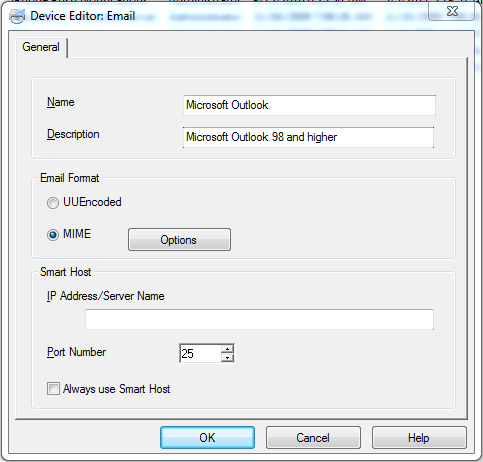
 

ka04W000000Oh5EQAS_0EM4400000029fN.png

 
ACTION:
The device that is trying to resolve to the wrong address needs to be changed to the correct address. 


Comment

0 comments

Details

Knowledge Article

Published:

June 5, 2017

Last Updated:

June 5, 2017