EducationSoftwareStrategy.com
StrategyCommunity

Knowledge Base

Product

Community

Knowledge Base

TopicsBrowse ArticlesDeveloper Zone

Product

Download SoftwareProduct DocumentationSecurity Hub

Education

Tutorial VideosSolution GalleryEducation courses

Community

GuidelinesGrandmastersEvents
x_social-icon_white.svglinkedin_social-icon_white.svg
Strategy logoCommunity

© Strategy Inc. All Rights Reserved.

LegalTerms of UsePrivacy Policy
  1. Home
  2. Topics

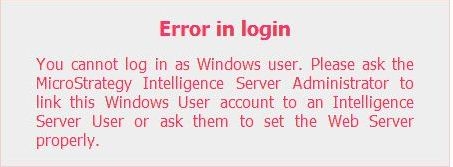
KB42210: "Error in login" error message is displayed when logging into MicroStrategy Web 9.x with Windows authentication.


Community Admin

Placeholder •


SYMPTOM:
 
After configuring the Intelligence Server to use Windows authentication, linking the Strategy user to a Windows account and setting the login settings in Strategy Web administrator, the user cannot log into Web and gets the following error message:
 

ka04W000000OcjiQAC_0EM4400000026tG.jpeg

 
CAUSE:
 
The configuration changes made prior to the user login may not have been applied on the web server.
 
ACTION:
 
Restart the web server.


Comment

0 comments

Details

Knowledge Article

Published:

July 11, 2017

Last Updated:

July 11, 2017