EducationSoftwareStrategy.com
StrategyCommunity

Knowledge Base

Product

Community

Knowledge Base

TopicsBrowse ArticlesDeveloper Zone

Product

Download SoftwareProduct DocumentationSecurity Hub

Education

Tutorial VideosSolution GalleryEducation courses

Community

GuidelinesGrandmastersEvents
x_social-icon_white.svglinkedin_social-icon_white.svg
Strategy logoCommunity

© Strategy Inc. All Rights Reserved.

LegalTerms of UsePrivacy Policy
  1. Home
  2. Topics

KB422218: "Object with ID 'XXXXXX' and type 33 (ServerDef) is not found in the metadata. it may have been deleted." error message appears when creating a project in 3-tier project source in MicroStrategy Developer 9.x/10.x


Stefan Zepeda

Salesforce Solutions Architect • Strategy


This article explains a possible reason for error message "Object with ID 'XXXXXX' and type 33 (ServerDef) is not found in the metadata. it may have been deleted." appearing when creating a project in a 3-tier project source in MicroStrategy Developer.

SYMPTOM:
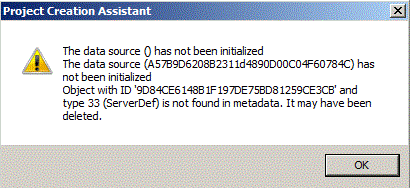
"Object with ID 'XXXXXX' and type 33 (ServerDef) is not found in the metadata. it may have been deleted." error message appears when creating a project in a 3-tier project source in Strategy Developer, as shown below:
 

ka02R000000kV4pQAE_0EM440000002HNW.gif


The data source () has not been initialized
​The data source (XXXXXX) has not been initialized
Object with ID ‘XXXXXX’ and type 33 (ServerDef) is not found in metadata. It may have been deleted.

 
CAUSE:
One possible cause is that the Intelligence Server is shut down due to certain unknown reason during the process of project creation.
ACTION:
Check the Intelligence Server status in Strategy Service Manager. Start the Intelligence Server and try to create the project again.

KB422218


Comment

0 comments

Details

Knowledge Article

Published:

June 8, 2017

Last Updated:

November 29, 2018