In Strategy 9.3.0 and later a new function was added in the GUI in Web to create subtotal from base metrics. These metrics are calculated in the analytical engine, and thus have to be defined as derived metrics. This function is not available in Developer
The following scenario describes how to create a distinct count subtotal from base report:
1 Create a report A with only “year” in row and ”category” in column; add customer in report object window only.
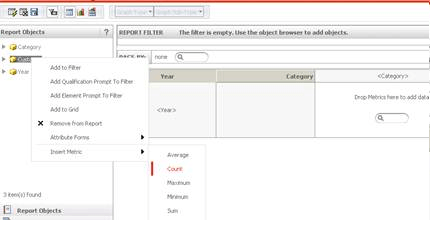
2 in Web, navigate to the report in edit mode, right click “customer” and insert metric Count as shown below:
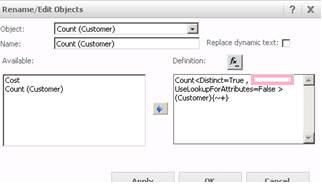
3. The metric is not based on any Fact, thus in this scenario we will specify: FactID=Cost. Since we are doing a distinct count, make sure Distinct=True is one of the expressions within the definition of the metric.
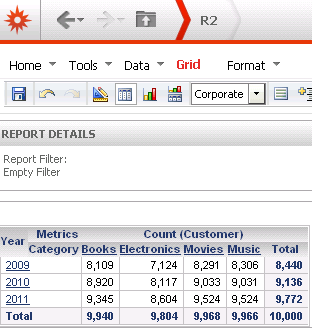
4. Now when the user runs the report, it shall display the following:
NOTE: A standalone metric may be necessary in at least the report objects window in order for the results to display as desired.
Note: If a user creates a free-form derived metric by "New Metric" in web it will not be a subtotal from base. Though the metric cannot be created in Developer, once it is created in web, Developer users can access it in Developer. Also make sure what is being count distinct is also in the report objects window.
Please contact Strategy Technical support for further assistance.
