EducationSoftwareStrategy.com
StrategyCommunity

Knowledge Base

Product

Community

Knowledge Base

TopicsBrowse ArticlesDeveloper Zone

Product

Download SoftwareProduct DocumentationSecurity Hub

Education

Tutorial VideosSolution GalleryEducation courses

Community

GuidelinesGrandmastersEvents
x_social-icon_white.svglinkedin_social-icon_white.svg
Strategy logoCommunity

© Strategy Inc. All Rights Reserved.

LegalTerms of UsePrivacy Policy
  1. Home
  2. Topics

KB422251: “Project main DBRole should not be NULL or read-only” error message received when using Microsoft Excel 2003 as data source


Community Admin

• Strategy


SYMPTOM:
 
The following error message appears when running reports against Microsoft Excel 2003 in Strategy 9.0.1:


Project main DBRole should not be NULL or read-only
 
 
This issue does not occur when running the reports SQL statements manually through the Strategy DB Query Tool or running Freeform report.
 
 
CAUSE:
 
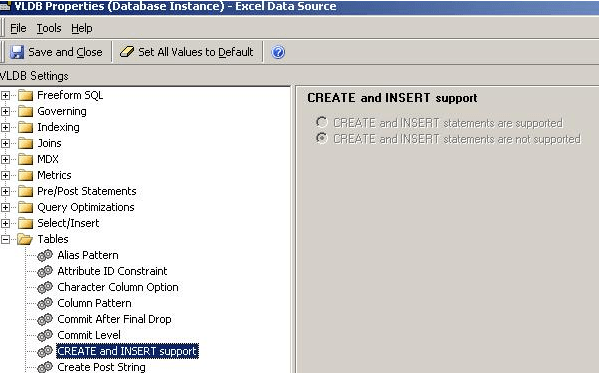
It is working as designed. This issue occurs because the VLDB property CREATE and INSERT support is set to CREATE and INSERT statements are not supported as shown:


ka04W00000148V8QAI_0EM440000002HO0.png


ACTION:
 
Please, follow the steps below to enable the writing on the desired Database Instance:
 

  1. In Strategy Desktop, expand the Administration options, so expand the Configuration Managers options and click on Database Instances.
  2. Right click on the desired Database Instance and select  VLDB Properties.
  3. Expand the entry Tables, click on the option CREATE and INSERT support, so change its configuration to CREATE and INSERT statements are supported.   

 
NOTES:
 
KB422251


Comment

0 comments

Details

Knowledge Article

Published:

May 16, 2017

Last Updated:

August 26, 2022