EducationSoftwareStrategy.com
StrategyCommunity

Knowledge Base

Product

Community

Knowledge Base

TopicsBrowse ArticlesDeveloper Zone

Product

Download SoftwareProduct DocumentationSecurity Hub

Education

Tutorial VideosSolution GalleryEducation courses

Community

GuidelinesGrandmastersEvents
x_social-icon_white.svglinkedin_social-icon_white.svg
Strategy logoCommunity

© Strategy Inc. All Rights Reserved.

LegalTerms of UsePrivacy Policy
  1. Home
  2. Topics

KB42227: How to disable the major grid lines of a graph in MicroStrategy Web 9.4.1 and above.


Community Admin

• Strategy


Description

When creating graphs via Reports or Documents in Strategy Web, users may want to remove the minor grid lines of the graph they are creating. An example of the current state and desired state are shown in the images below.
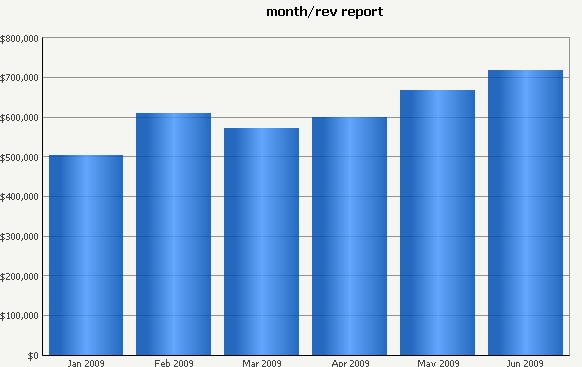
With Grid lines:


ka04W00000147w3QAA_0EM4400000026sS.png


Without Grid lines:


ka04W00000147w3QAA_0EM4400000026sR.png


Solution


In order to remove these grid lines, follow the steps below:
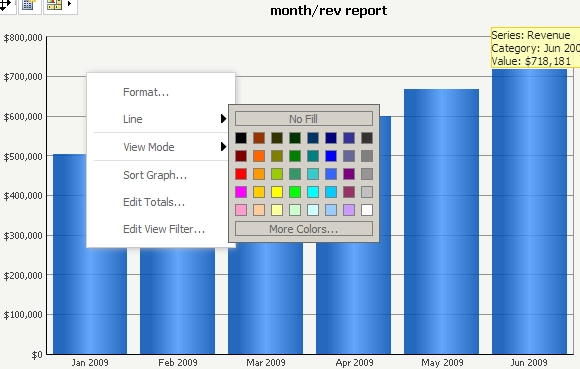
  • From Strategy Web, view the document in Editable Mode. Right-click on one of the horizontal lines within the graph to get the context menu shown below:
     
ka04W00000147w3QAA_0EM4400000026sT.png
  •  
    Note: if the user doesn't target the line successfully, the context menu will show different options as shown below:
     
ka04W00000147w3QAA_0EM4400000026sQ.png
  •  
    These context menu options are not those needed for this use case. Note that "Fill" is one of the options, whereas when the line has successfully been clicked on, it is not displayed.
    If necessary, the browser's Zoom functionality can be used to increase the size of the line. Zoom into 150% to make the line easier to click.
  • Select Line > "No Fill".  The graph will now appear without grid lines, as shown below:
     
ka04W00000147w3QAA_0EM4400000026sR.png


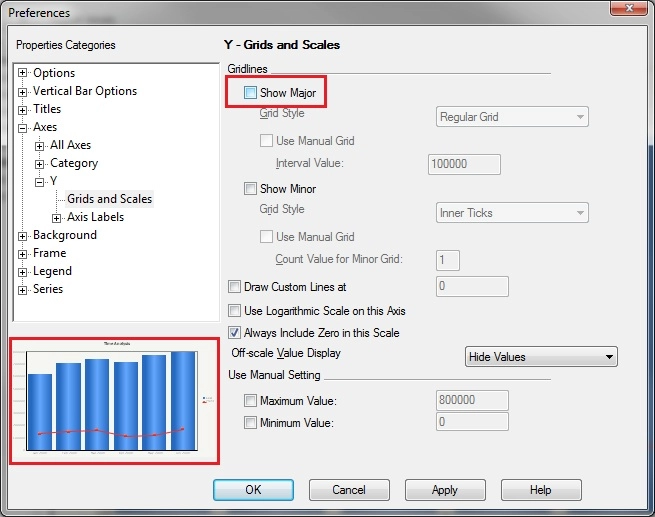
Note: if making this change from Strategy Web is not suitable, this can also be changed from Strategy Developer, as shown below.

ka04W00000147w3QAA_0EM4400000026sO.jpeg


Additional resources:

Formatting individual graph objects


Comment

0 comments

Details

Knowledge Article

Published:

April 3, 2017

Last Updated:

April 3, 2017