SYMPTOM:
In Strategy Developer, 9.4.1 and 10.x, when a user chooses to use either the "Microsoft Analysis Services 2005/2008 (MDX Cube Provider)" or the "Microsoft Analysis Services 2012 (MDX Cube Provider)" database connection type and then creates a new database connection, the user should notice that the "Additional connection string parameters" field automatically gets filled in with "USE_MTOM", as shown below. This is because the Strategy MDX cube provider requires this connection string parameter. If using a 3rd party XMLA provider, there is no need for the "USE_MTOM;" parameter.
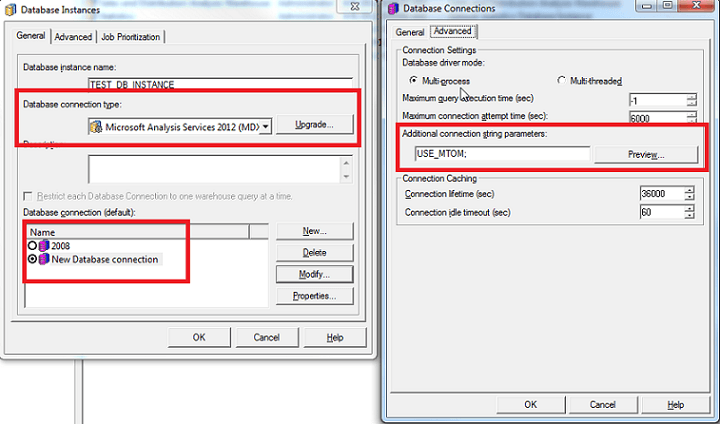
However, if a user were to later choose a different database connection type, the 'Additional connection string parameters' field does not automatically get cleared.
CAUSE:
This is working as designed in Strategy 9.4.1 and 10.x. This can cause problems for those who originally chose the wrong database connection type and later switched.
ACTION:
If at any point "Microsoft Analysis Services 2005/2008 (MDX Cube Provider)" or the "Microsoft Analysis Services 2012 (MDX Cube Provider)" database connection type was chosen and later changed, the user should clear out the "Additional connection string parameter" and if needed, use the correct one.
