EducationSoftwareStrategy.com
StrategyCommunity

Knowledge Base

Product

Community

Knowledge Base

TopicsBrowse ArticlesDeveloper Zone

Product

Download SoftwareProduct DocumentationSecurity Hub

Education

Tutorial VideosSolution GalleryEducation courses

Community

GuidelinesGrandmastersEvents
x_social-icon_white.svglinkedin_social-icon_white.svg
Strategy logoCommunity

© Strategy Inc. All Rights Reserved.

LegalTerms of UsePrivacy Policy
  1. Home
  2. Topics

KB422578: What common password security policy requirements does MicroStrategy 10.x support?


Community Admin

• Strategy


In the MicroStrategy 8.x Product Suite, there are only a handful of options available for system administrators to enforce password security. All of the options can be set in the User Editor under the ‘General’ tab.

SYMPTOM:
 
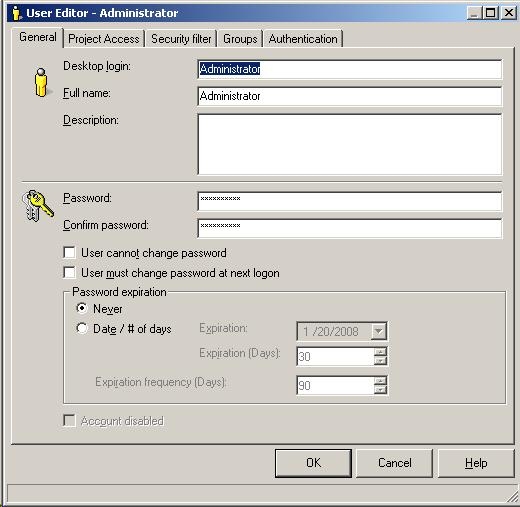
In the Strategy 10.x Product Suite, there are only a handful of options available for system administrators to enforce password security. All of the options can be set in the User Editor under the ‘General’ tab, as shown below:
 

ka04W000000OfPbQAK_0EM440000002HWA.jpeg


  1. The Administrator or user can initially setup a login password.
  2. The Administrator can revoke or grant the right for a Strategy user to change his/her own password. If revoked, only an Administrator can change the user's password.
  3. The Administrator can force a Strategy user to change his/her password upon the next successful login.
  4. The Administrator can set an expiration date for the Strategy user's login password. For example: January 1, 2008 or 30 days from the day the password is set.
  5. The Administrator can set a regular occurring expiration for the Strategy user's login password. For example: Every 90 days.

Today it is a common for businesses to require stricter password enforcement based on the context of the password. Several examples are:
 

  1. Requiring both a number and a character in the password
  2. Requiring both an uppercase and a lowercase letter in the password
  3. Setting minimum and maximum character lengths for the password
  4. Denying users the ability to use dictionary words or names as a password
  5. Denying users the ability to reuse the a password that was previously used.

While it is not currently possible to enforce any of these stricter password rules through the Strategy Product Suite, there are two ways to leverage external sources which can apply these policies. Again, both of the following workarounds leverage external 3rd party applications, it is these non-Strategy applications which actually enforce the password policies.
 
LDAP Authentication
LDAP Authentication allows Strategy to leverage existing LDAP servers to enforce password policies and user restrictions. Using LDAP, Strategy users are seamlessly linked to existing LDAP users which perform the actual authentication and policy management. For more information on configuring LDAP with Strategy please review one or more of the following technical documents:
 

  • KB12920 (KB5300-802-0708): How to configure LDAP connectivity using Cleartext or SSL for Strategy Intelligence Server Universal 8.0.2 on HP-UX 11iv2
  • KB12066 (KB5303-8X-0660): How to configure LDAP connectivity using Cleartext or SSL using Sun ONE Directory SDK for Strategy Intelligence Server 8.x.x on Solaris
  • KB13041 (KB5303-8X-0719): How to configure LDAP connectivity using SSL authentication with Strategy Intelligence Server 8.x on Windows Operating Systems
  • KB12045 (KB5303-8X-0643): How to configure LDAP connectivity using Cleartext or SSL using Tivoli version 6.0 and GSKit 7 for Intelligence Server 8.x on AIX 5.2 and 5.3.
  • KB12067 (KB5303-802-0660): How to configure LDAP connectivity using Clear text (using OpenLDAP) or SSL (using OpenSSL) for Strategy Intelligence Server 8.0.1 and newer on Linux

Windows NT Authentication
If the Strategy Intelligence Server 8.x is running on a Windows OS and the users using Strategy are on a Windows network, the System Administrator can link the Windows network ID to the Strategy user login. As with LDAP, the password security will be enforced on the Windows Network side with password changes cascading to the Strategy user account. For more information regarding NT Authentication please see the System Administration Guide, Installation and Configuration Guide.
 
KB6781: How to link a user to a Microsoft Windows NT user account in MicroStrategy Developer 10.x and MicroStrategy Administrator - Command Manager 10.x
 
KB422578


Comment

0 comments

Details

Knowledge Article

Published:

May 5, 2017

Last Updated:

January 9, 2019