EducationSoftwareStrategy.com
StrategyCommunity

Knowledge Base

Product

Community

Knowledge Base

TopicsBrowse ArticlesDeveloper Zone

Product

Download SoftwareProduct DocumentationSecurity Hub

Education

Tutorial VideosSolution GalleryEducation courses

Community

GuidelinesGrandmastersEvents
x_social-icon_white.svglinkedin_social-icon_white.svg
Strategy logoCommunity

© Strategy Inc. All Rights Reserved.

LegalTerms of UsePrivacy Policy
  1. Home
  2. Topics

KB42259: How to create an Object Prompt with a list of templates in MicroStrategy 9.x?


Stefan Zepeda

Salesforce Solutions Architect • Strategy


How to create an Object Prompt with a list of templates in MicroStrategy 9.x?

Symptom:
 
Users would like to create an object prompt where they choose from a list of templates for a report in Strategy 9.x.
 
Steps to Reproduce:
 
1. Create a New Object Prompt
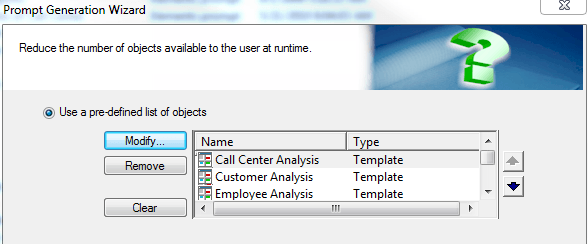
2. Add only templates to the Pre-Defined List of Objects as seen below:
 

ka044000000kUHHAA2_0EM440000002Cyf.png

 
3. Set the Minimim and Maximum Objects to 1 and Check the Prompt Answer Required checkbox as seen below:
 

ka044000000kUHHAA2_0EM440000002Cyq.png

 
4. Save the Prompt
5. Create a new report and drag the newly created prompt onto the template as seen below:
 

ka044000000kUHHAA2_0EM440000002Cyt.png

 
6. When the report is executed, the user will be prompted to choose a template as seen below:


ka044000000kUHHAA2_0EM440000002Cyv.png

42259


Comment

0 comments

Details

Knowledge Article

Published:

June 5, 2017

Last Updated:

March 28, 2019