SYMPTOM:
Users trying to perform manual and scheduled dataloads in Strategy Enterprise Manager 9.x are getting inconsistent and sporadic dataload failures. Both scheduled and manual data loads will fail at unexpected times and users receive the following error:
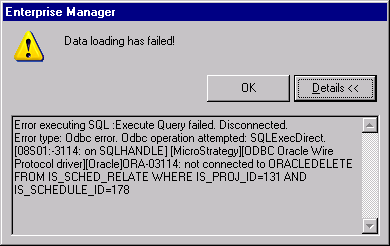
Users also see the following error in the MSTRmigration.log:
ORA-03114: not connected to ORACLE
CAUSE:
It is possible the value for the 'TcpMaxDataRetransmission' Windows registry key is too low. 'TcpMaxDataRetransmissions' determines how many times TCP retransmits an unacknowledged data segment over an existing connection before aborting the connection.
ACTION:
Increase the value of the 'TcpMaxDataRetransmission' registry key. This registry key is located at:
Sample Code/Error
HKEY_LOCAL_MACHINE\System\CurrentControlSet\Services\Tcpip\Parameters
Registry Modification Warning:
Modifying registry values incorrectly may cause serious, system-wide problems that may require the re-installation of Microsoft Windows. Any edit of the registry is done at the user's own risk. Since these are user-initiated changes, they are not covered by any Strategy warranty. If using Microsoft Windows, the user should backup the registry and/ or update an Emergency Repair Disk prior to alterations.
