EducationSoftwareStrategy.com
StrategyCommunity

Knowledge Base

Product

Community

Knowledge Base

TopicsBrowse ArticlesDeveloper Zone

Product

Download SoftwareProduct DocumentationSecurity Hub

Education

Tutorial VideosSolution GalleryEducation courses

Community

GuidelinesGrandmastersEvents
x_social-icon_white.svglinkedin_social-icon_white.svg
Strategy logoCommunity

© Strategy Inc. All Rights Reserved.

LegalTerms of UsePrivacy Policy
  1. Home
  2. Topics

KB42280: How to enable subtotals for custom groups on the report level in MicroStrategy 10.x?


Stefan Zepeda

Salesforce Solutions Architect • Strategy


Symptom:
The user would like to enable subtotals for custom groups on the report level in Strategy 10.x.
 
Steps to Reproduce:
 
1. Add  the Age Groups Custom Group and the Profie and Revenue metrics to a report in Strategy 10.x
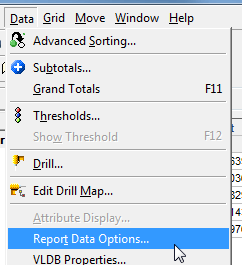
2. Select Data > Report Data Options
 

ka02R000000kbxVQAQ_0EM440000002Cyu.png

 
3. In the Report Data Options Window, Select Calculations > Subtotals.
4. In the Calculations - Subtotals window, Select the desired Custom Group  and select Yes in the Allow subtotals drop down.
 

ka02R000000kbxVQAQ_0EM440000002Cys.png

 
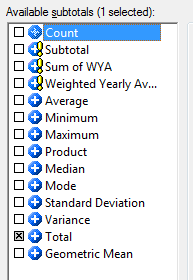
5. Select the desired subtotal from the Data > Subtotals menu
 

ka02R000000kbxVQAQ_0EM440000002Cye.png

 
6. This will allow the subtotals for the Custom Group on the selected report only
 

ka02R000000kbxVQAQ_0EM440000002Cyp.png

Comment

0 comments

Details

Knowledge Article

Published:

June 5, 2017

Last Updated:

June 5, 2017