EducationSoftwareStrategy.com
StrategyCommunity

Knowledge Base

Product

Community

Knowledge Base

TopicsBrowse ArticlesDeveloper Zone

Product

Download SoftwareProduct DocumentationSecurity Hub

Education

Tutorial VideosSolution GalleryEducation courses

Community

GuidelinesGrandmastersEvents
x_social-icon_white.svglinkedin_social-icon_white.svg
Strategy logoCommunity

© Strategy Inc. All Rights Reserved.

LegalTerms of UsePrivacy Policy
  1. Home
  2. Topics

KB42281: "Task #0 failed: (Searching for "=" returned more than one match.)" error appears when creating a Visual Insight Analysis report, in MicroStrategy Web 9.x and 10.x


Community Admin

• Strategy


KB42281: "Task #0 failed: (Searching for "=" returned more than one match.)" error appears when creating a Visual Insight Analysis report, in MicroStrategy Web 9.x and 10.x

SYMPTOM:
 
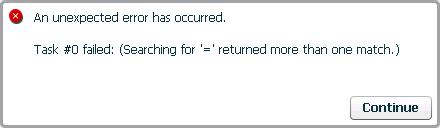
When creating a Visual Insight Analysis in Strategy Web, the following error appears:
 

ka04W000000OfoHQAS_0EM4400000026ry.png

 
Sample Code/Error
An unexpected error has occurred.
Task #0 failed: (Searching for '=' returned more than one match.)
 
STEPS TO REPRODUCE:
 
Follow these steps to reproduce the issue:

  1. Create a shortcut off any object and call it '=', '<' or '>'.
  2. Log into Strategy Web, right-click on any report and select "Create Analysis".

CAUSE:
 
This is a known issue in Strategy Web 9.x and 10.x that occurs when a shortcut is called either '=',  '<' or '>'.
 
ACTION:
 
Contact Strategy Technical Support for an update on the status of this issue.
 
WORKAROUND:
 
As a workaround, customers encountering this issue can delete the problematic shortcut.


Comment

0 comments

Details

Knowledge Article

Published:

July 21, 2017

Last Updated:

July 21, 2017