EducationSoftwareStrategy.com
StrategyCommunity

Knowledge Base

Product

Community

Knowledge Base

TopicsBrowse ArticlesDeveloper Zone

Product

Download SoftwareProduct DocumentationSecurity Hub

Education

Tutorial VideosSolution GalleryEducation courses

Community

GuidelinesGrandmastersEvents
x_social-icon_white.svglinkedin_social-icon_white.svg
Strategy logoCommunity

© Strategy Inc. All Rights Reserved.

LegalTerms of UsePrivacy Policy
  1. Home
  2. Topics

KB42308: Unable to delete an empty attribute form through MicroStrategy Developer 9.4.x after removing the freeform SQL reports that were associated with the form


Stefan Zepeda

Salesforce Solutions Architect • Strategy


This article discusses a metadata inconsistency found within an attribute expression. This is seen after removing the attribute form from a freeform SQL report definition.

SYMPTOM:
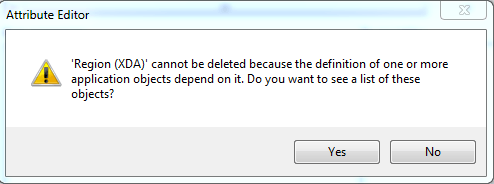
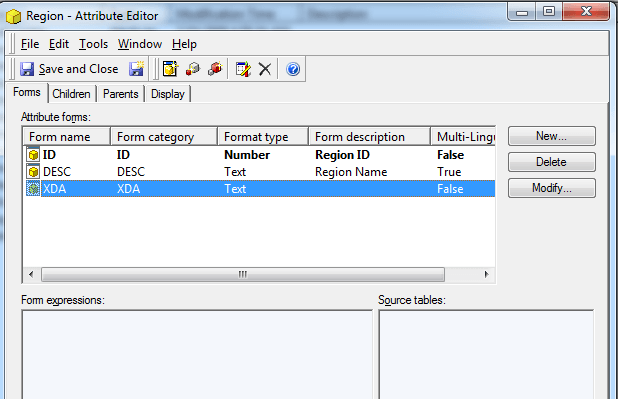
Within the attribute editor in Strategy Developer 9.4.x the user is trying to delete an attribute form which has no expression but it cannot be deleted due to dependents.  This attribute form at one time had an expression that was linked to a freeform SQL report but then later the expression was removed. 
 

ka044000000kH7iAAE_0EM440000002Cyn.png


ka044000000kH7iAAE_0EM440000002Cyi.png

 
CAUSE:
This condition has been reported in Strategy 9.4.x, however its root cause is unknown. 
 
ACTION:
Please contact Strategy Technical Support for further assistance.  In order to track down the cause of the inconsistency, customers encountering this issue should make note of Schema-related changes, Object Migrations, or error messages prior to experiencing the problem.  Change Journaling, if it has been enabled, can help in preserving this information.
 
WORKAROUND:
Having this form will not lead to errors so it can be left within the attribute for later use if desired.


Comment

0 comments

Details

Knowledge Article

Published:

April 4, 2017

Last Updated:

April 4, 2017