EducationSoftwareStrategy.com
StrategyCommunity

Knowledge Base

Product

Community

Knowledge Base

TopicsBrowse ArticlesDeveloper Zone

Product

Download SoftwareProduct DocumentationSecurity Hub

Education

Tutorial VideosSolution GalleryEducation courses

Community

GuidelinesGrandmastersEvents
x_social-icon_white.svglinkedin_social-icon_white.svg
Strategy logoCommunity

© Strategy Inc. All Rights Reserved.

LegalTerms of UsePrivacy Policy
  1. Home
  2. Topics

KB423169: How to define a Microsoft Excel 2007 file as a data source for MicroStrategy 9.3.1 projects?


Community Admin

• Strategy


Data saved in Microsoft Excel 2007 file as .xlsx format can be used as a data source for MicroStrategy 9.3.1 projects. MicroStrategy Tutorial project has a pre-defined database instance named "Excel Data Source" which can be used as reference.

Data saved in Microsoft Excel 2007 file as .xlsx format can be used as a data source for Strategy 9.3.1 projects. Strategy Tutorial project has a pre-defined database instance named "Excel Data Source" which can be used as reference.
 
Follow the steps below to define a Microsoft Excel 2007 file as a data source.
 
Prerequisites:
 
Microsoft Office 2007 32-bit version needs to be installed already.
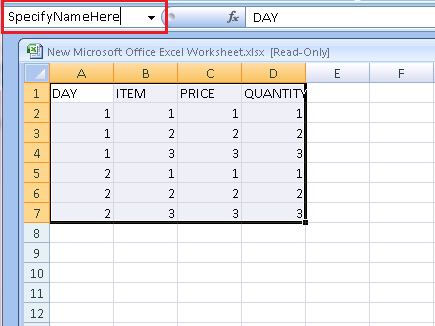
 

  1.  Open the Excel file, and then choose the data. Specify the table name in the name box.
ka04W000000OakFQAS_0EM440000002JCB.png


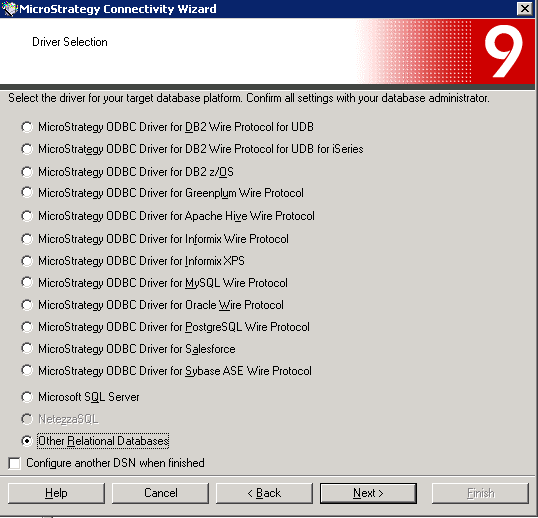
  • Open Strategy Connectivity Wizard, and choose "Other Relational Databases".
ka04W000000OakFQAS_0EM440000002JC9.png


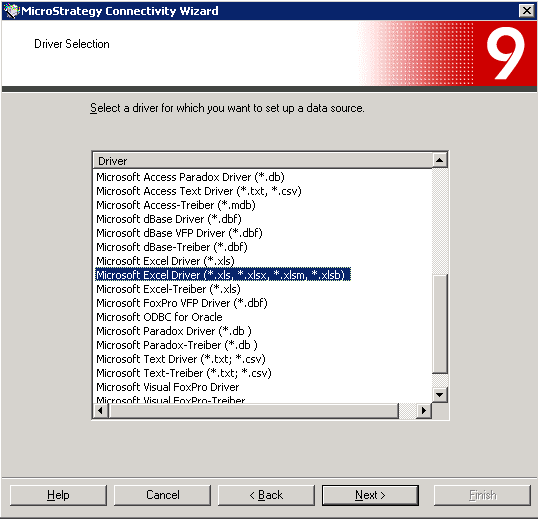
  • Choose "Microsoft Excel Driver (*.xls, *.xlsx, *.xlsm, *.xlsb)".
ka04W000000OakFQAS_0EM440000002JC2.png


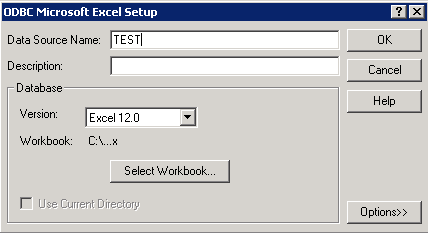
  • Specify a name to DSN, and select the Excel file.
ka04W000000OakFQAS_0EM440000002JCC.png


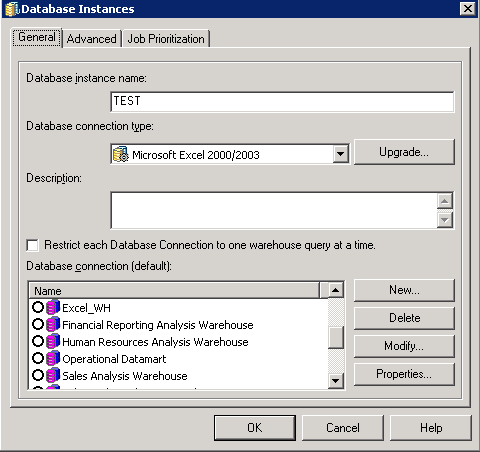
  •  In Strategy Desktop 9.3.1, create a new database connection.
ka04W000000OakFQAS_0EM440000002JCA.png


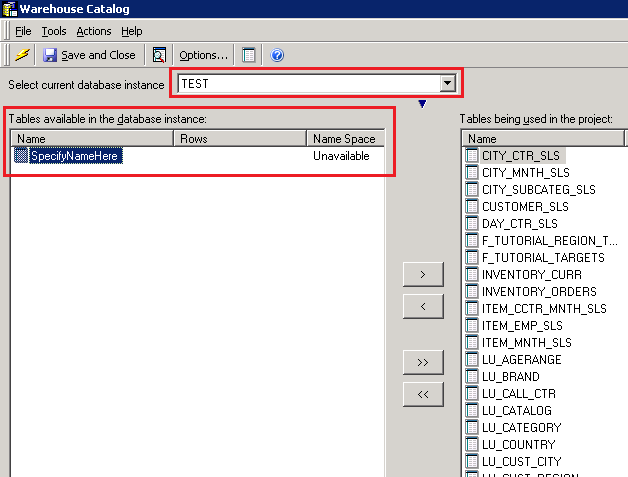
  • Open the project which will use the excel file as a data source. And then open Warehouse Catalog to add the table in.
ka04W000000OakFQAS_0EM440000002JC8.png


Third Party Software Installation WARNING
 
The third-party product(s) discussed in this technical note is manufactured by vendors independent of Strategy. Strategy makes no warranty, express, implied or otherwise, regarding this product, including its performance or reliability. 
KB423169


Comment

0 comments

Details

Knowledge Article

Published:

May 4, 2017

Last Updated:

December 31, 2018