SYMPTOM:
"Permission denied" error message appears when trying to export Change Journal log changes in Windows 7 for users than doesn’t have Windows Administrator privileges.
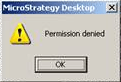
Permission denied
STEPS TO REPRODUCE:
1 Open Strategy Desktop -> Administration -> Change Journal Transactions
2 Right Click the right pane and select “Export list”

CAUSE:
This behavior is working by design because the NT user launching Developer does not have enough permission to access the default folder. The exported Change Journal log file is saved in the Strategy Common Files directory by default.
ACTION:
Run Strategy Desktop using “Run as Administrator”. This can be performed by right clicking the Desktop icon and select “Run as Administrator” option.
There is an enhancement request for changing the destination path of the export file list. Contact the Strategy Technical Support for an update on this issue.
KB42326
