EducationSoftwareStrategy.com
StrategyCommunity

Knowledge Base

Product

Community

Knowledge Base

TopicsBrowse ArticlesDeveloper Zone

Product

Download SoftwareProduct DocumentationSecurity Hub

Education

Tutorial VideosSolution GalleryEducation courses

Community

GuidelinesGrandmastersEvents
x_social-icon_white.svglinkedin_social-icon_white.svg
Strategy logoCommunity

© Strategy Inc. All Rights Reserved.

LegalTerms of UsePrivacy Policy
  1. Home
  2. Topics

KB42351: System Manager component does not appear in the Select Components section of the MicroStrategy 9.3.x and newer installer


Community Admin

• Strategy


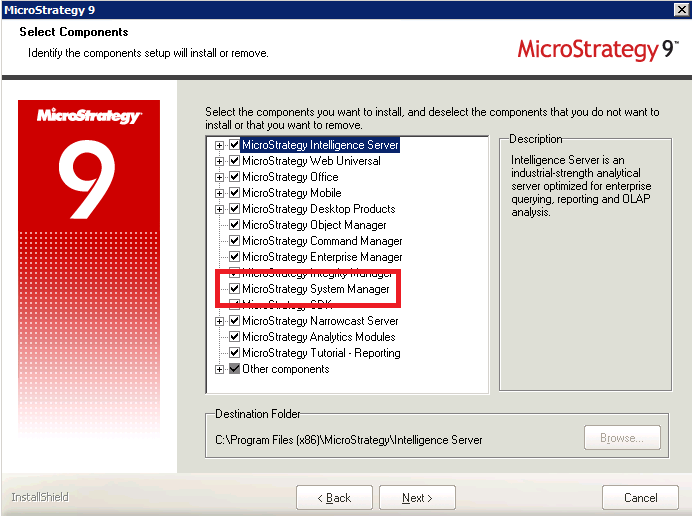
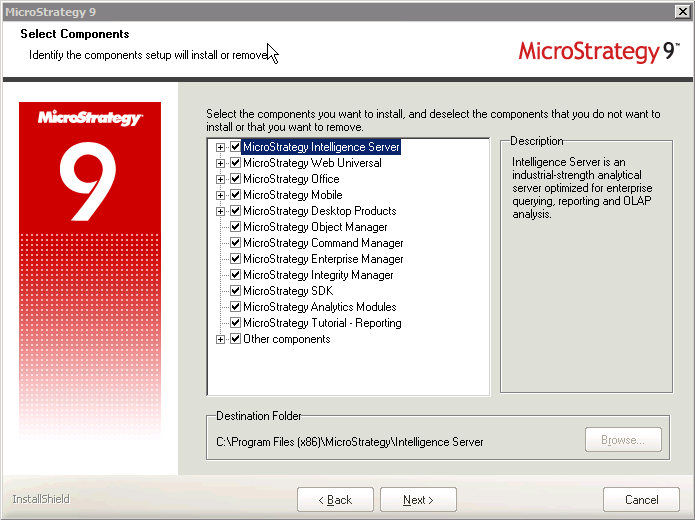
The System Manager component does not appear in the 'Select Components' section of the MicroStrategy 9.3.x and newer installer.

SYMPTOM:
The System Manager component does not appear in the 'Select Components' section of the Strategy 9.3.x and newer installer.
 

ka04W000000Ogl0QAC_0EM4400000029er.png


ka04W000000Ogl0QAC_0EM4400000029ec.png

 
CAUSE:
The System Manager component will only appear if the license key used during the installation contains a System Manager license.
 
ACTION:
A license key containing a System Manager license needs to be used during installation for the System Manager component to be available for installation.


Comment

0 comments

Details

Knowledge Article

Published:

June 12, 2017

Last Updated:

June 12, 2017